
Website Builder uKit
6.30$
Your website, your rules: Use a powerful visual editor with access to SEO settings and analytics to transform a simple landing page into an effective sales tool.
Description
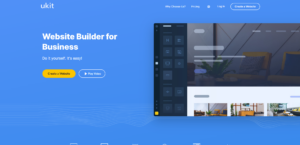
uKit – it’s a cloud-based website builder: you assemble pages in a visual editor, and the website itself “lives” on the platform. This means you don’t usually need to find hosting, install an engine, configure certificates, and update them separately; it’s all part of the service.
In practice, uKit is chosen when you need a working website without a developer: a service website, a small corporate site, an advertising landing page, or a portfolio. In this format, two things are important: how quickly can you assemble and publish pages, and how manageable will the website be later: can you change the structure, meta tags, enable analytics, and avoid running into limitations at every step.
Price uKit
uKit has four paid plans: “Minimal”, “Basic”, “eCommerce”, “Pro”.
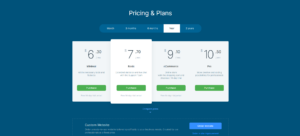
- “Minimal” – when you need a basic website without a store.
- “Basic” – when support and some statistics and website management features are more important.
- “eCommerce” – when you need a shopping cart and sales.
- “Pro” – when you need more control, including code insertion and advanced integrations.
There’s also a “free use” option: uKit has a trial period, but after it ends, the site doesn’t remain available as a “free plan”; it’s effectively frozen until payment is made.
Editing a website in uKit: what it looks like in action
Editing in uKit is a drag-and-drop process: you open a website in the editor and edit it directly on the canvas. All the main controls are located in the left panel. You can also add blocks and widgets, switch pages, create new pages, choose a design and color scheme, save or roll back changes, and publish the changes to the live website.

The process is as follows: you select the desired block or widget, drag it to the desired location, then click on it and change the contents through the settings. This process is the same for many widgets: click on the widget, see the advanced settings panel, enter text, contacts, and links, and then design it.
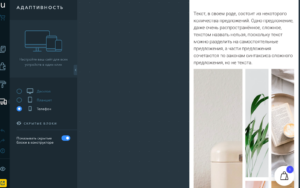
The builder’s strength lies in the adaptability of the websites created with it. In uKit, you can switch between desktop, tablet, and phone views and customize how elements appear on each device. For example, you can change the background for each version separately, hide individual blocks and widgets on a phone, adjust the text size and line spacing, and choose whether to arrange widgets in one or two columns on a tablet.
SEO settings
uKit includes a basic set of SEO settings that cover typical needs for ensuring a website is properly indexed and manageable. You can add your site to Yandex Webmaster and Google Search Console (to help search engines find and index it faster), and connect Yandex Metrica and Google Analytics for statistics. You can manage meta tags at the page level: Title, Description, and Keywords.
Indexation control is a useful feature. In uKit, you can prevent indexing of a specific page using the page’s SEO settings (effectively, “hide it from search engines”). uKit also supports H1–H6 headings in text blocks and allows you to set alt/titles for images. These elements help maintain a clean page structure and avoid common mistakes.
Online store and integrations
In uKit, commerce is tied to the “eCommerce” plan. This plan adds functionality for creating an online store to the “Basic” plan.
Integrations and embeds are categorized by plan. “Basic” allows you to connect Facebook and VK pixels, while “Pro” allows you to add your own code to your website. You can also connect Google Tag Manager to a uKit website via a widget on the dashboard, allowing you to add the necessary tags.
Who is it suitable for?
uKit is suitable for those who need a clear and manageable website without unnecessary technical overhead. These are primarily small business owners and professionals who value a quick launch: service websites, small corporate websites, advertising landing pages, portfolios, or project presentations. For such projects, it’s usually important that the website can be built and updated independently, with the basic technical features included within the service.
This builder is also convenient for projects that require marketing integrations (using Google Tag Manager or adding tracking pixels). It’s useful if you’re running ads, testing landing pages, and want to configure events and conversions without complex development.
Contacts uKit
- Website: ukit.com
- Company: uKit Group
- Date of company establishment: 2015
- Website language: Russian, English, Portuguese, Romanian, Polish, Turkish.
Technical support contact information
Technical support: feedback form on the website, knowledge base.
- social media: Telegram.
Payment methods: Bank cards (Visa, MasterCard), PayPal.