

FlashID Review: A Universal Browser with Detection Protection for Global Growth.
10.00$
Lightweight, Secure, Unlimited. FlashID is an innovative platform that combines an anti-detection browser and a cloud environment for secure management of multiple accounts, protection from tracking, and efficient automation of workflows.
Description
Disclosure: This site may contain affiliate links. If you make a purchase through these links, I may receive a commission at no additional cost to you. However, all opinions are my own.
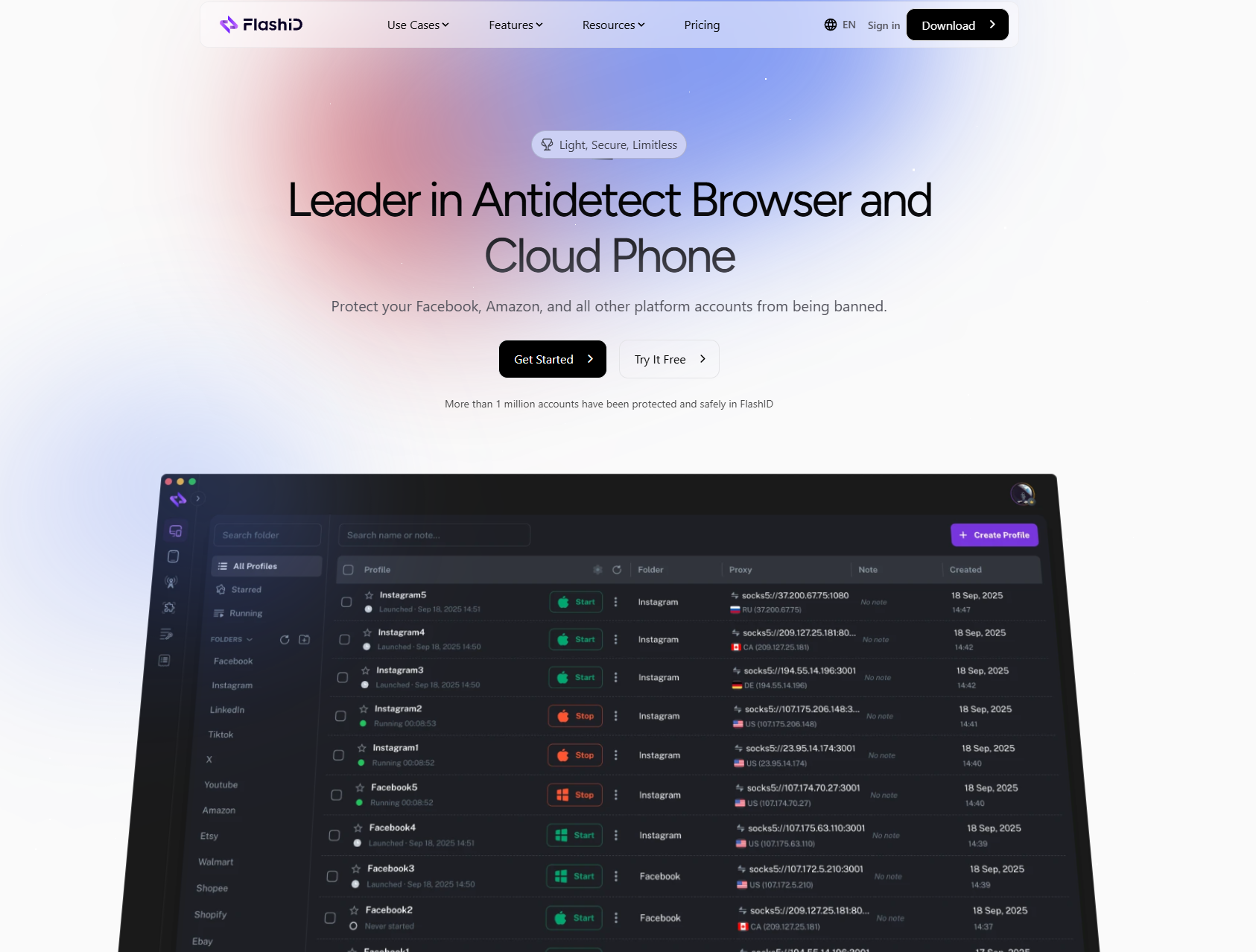
FlashID is a next-generation cloud-based browser designed to protect against detection and management of virtual devices. It allows you to run multiple, completely isolated browser or mobile device profiles on secure cloud servers, eliminating the risks of device fingerprinting, cookie leaks, or account linking. Simply put, FlashID functions as a combination of a cloud-based phone system and an undetectable browser. You can remotely access all your profiles from any device, securely managing all your accounts simultaneously.
Who is this for?
FlashID is designed specifically for professionals who need separate online identities or manage multiple accounts, including:
- Cross-border e-commerce (Amazon, Shopee, TikTok Shop, etc.)
- Advertising and marketing agencies managing dozens of advertising accounts (Facebook, Google, TikTok, Telegram)
- Affiliate marketers/lead generation teams managing advertising or registration networks
- App developers and testers performing multi-device testing with clean profiles
- Cybersecurity researchers/data analysts who require isolated, fingerprint-proof systems
In short, if you need to securely and efficiently manage multiple accounts, FlashID is for you.
Price (USD)
Current official promotion: 50% off select tariff plans
(Check the official website for current discounts)
| Name | Profiles | Approx. Monthly Price |
|---|---|---|
| Free | Up to 2 | $0 |
| Starter | ~10–50 | $5–$15 USD (depends on promo) |
| Team | ~100–500 | ≈ $22.5–$72.5 USD |
| Enterprise | 10,000+ | from $100 USD |
Key Benefits
Cloud Environment for Devices
Manage multiple virtual devices hosted in a cloud infrastructure.
Each profile operates independently with complete isolation—no shared hardware, no local traces.
Advanced Protection against Browser Fingerprinting
FlashID automatically generates realistic browser fingerprints (Canvas, WebGL, audio, fonts, time zone, etc.).
Unlike traditional emulators, which easily reveal virtual signatures, FlashID’s fingerprint simulations pass most platform checks.
Built-in Automation Console
Automate logins, publishing, advertising operations, or data collection without using third-party tools.
For developers, access to a REST API ensures seamless workflow integration.
Team-Friendly Workspace
Managers can create workspaces, assign roles, track activities, and control permissions—improving both transparency and data security.
Scalable cloud infrastructure
No on-premises setup or hardware expansion required. Launch hundreds of profiles and manage them remotely from anywhere.
Emulator Comparison
| Feature | Emulator | FlashID |
|---|---|---|
| Profiles Location | Local PC or Android VM | Cloud Server |
| Resource Usage | High (CPU / memory intensive) | Lightweight – browser access only |
| Isolation Level | Partial | Full system-level isolation |
| Fingerprint Realism | Often detectable | Near-native device fingerprint |
| Scalability | Limited by hardware | Instantly scalable |
How to set up FlashID step by step
Step 1 – Create an Account
Go to the official FlashID website and register for a free account. After confirming your email address, log in to access the control panel. The free trial offers a limited number of profiles and time, allowing you to test the basic features without paying.
Step 2 – Create Your First Profile
Click “New Profile” or “Create Profiles.” Choose whether you want to use a cloud browser or a virtual device. Give your profile a descriptive name that indicates its purpose, such as “US Facebook Store Account.” Each profile is automatically assigned a unique digital identity.
Step 3 – Add a Proxy
In the proxy settings, enter your residential or mobile proxy details. FlashID supports both HTTP and SOCKS5 proxies. Always select a location that matches your account’s target region to ensure your profiles appear authentic.
Step 4 – Run Profiles
Click “Run.” A new window will open—this represents your isolated profiles. Log in to the desired platform or application directly in this space. All browsing data, cookies, and cache remain private within the profile container.
Step 5 – Workflow Automation
Open the “Automation” section in the dashboard. You can schedule automated tasks such as logins, ad testing, publishing, or data collection. For complex projects, FlashID also supports API integration for connecting to external management systems or analytics software.
Step 6 – Collaborate with Your Team
Invite your team members from the “Team Center.” Assign roles with different access levels based on their responsibilities. This allows operators to process assigned profiles without sharing personal credentials. FlashID also supports synchronized actions, allowing you to duplicate tasks across multiple profiles simultaneously.
Contacts FlashID
- Website: flashid.net
- Website language: English, Ukrainian, Russian, Portuguese, and others.
Technical support language: English
Technical support contact information
Technical support is available via email and telegram.
- Email: support@flashid.net; partnership@flashid.net
- social media: YouTube, Telegram, Facebook, X (Twitter) .
Payment method: Bank cards (Visa, MasterCard), PayPal, USDT.






Stella –
As a team leader managing multiple Amazon stores and social media ad accounts, I’ve been constantly searching for a secure and hassle-free multi-account management solution. I tried local virtual machines before—they were too resource-heavy on my computer, and sharing them with the team was a huge hassle. I was also always worried about account association risks.
FlashID is the tool I settled on after trying several others. Two things impressed me the most:
1. Truly Lightweight and Worry-Free: It runs entirely in the cloud. I can log into the control panel from any computer, even a tablet, just by opening a browser, and directly operate all our store and ad accounts. No more setting up environments on every single computer, and any team member can get started immediately. This is a lifesaver for those of us who travel frequently.
2. Clear Team Permission Management: This was the key reason I chose it. I can create a “Workspace,” add our operations and ad specialists, and then assign different Amazon store profiles or Facebook ad accounts to the responsible colleagues. They can only see and operate the parts assigned to them, completely isolated from each other. I no longer have to share master passwords, which greatly enhances security and makes management crystal clear.
The setup process was simpler than I imagined. Basically, it was just registering, creating a profile (I chose the “Browser” mode), entering my own residential proxy, and clicking “Run.” An independent browser window opened, and the fingerprint information looked very natural. I used it to log into our Amazon Seller Central, and the process was smooth.
Their free plan allows creating 2 profiles, which is more than enough to thoroughly test whether the core features fit your needs. Our team is now on the “Team” plan, which is pay-as-you-go. The cost is controllable—you pay for what you use with no hidden fees.
A few small suggestions: It might take a little getting used to the concept of a cloud browser at first, but their interface is quite intuitive. For purely individual users managing a small number of accounts, you might need to evaluate your own usage frequency and budget.
Overall, if you are a team or individual who needs to manage multiple online accounts securely and efficiently, especially if you’re struggling with account association issues or tired of complex local setups, FlashID is absolutely worth your time to try. It has made our workflow much more professional and simpler.