Disclosure: This site may contain affiliate links. If you make a purchase through these links, I may receive a commission at no additional cost to you. However, all opinions are my own.
In this guide, I focus on 4 of the best antidetect browsers in 2026 for real work with multiple accounts, affiliate marketing, traffic arbitrage, and team workflows. The article also includes free-plan limits, a broader antidetect browser list, and user ratings so you can compare the main options before choosing a service.
There is no user who has personal information stored on a desktop/portable computer or mobile gadget that should not be disclosed in any way.
These can be passwords to bank cards and electronic wallets, video content from one’s own archive, or some scanned images of identity documents. For sure, if such data gets to fraudsters via the Internet, it can provide grounds for manipulation and blackmail.
Note: To protect your personal information, ensure comprehensive security, and create a demilitarized zone, dedicated software — anti-detect browsers — should be used. Each browser profile operates in an isolated environment with its own settings, cookies, and digital fingerprint, allowing you to safely separate multiple accounts.
What is an Antidetect Browser and Why Do You Need One
Ensuring the privacy of personal data is the primary goal of a user operating this type of software. An antidetect browser is a browser with isolated profiles and the ability to modify or spoof digital fingerprint parameters. Each profile appears to a website as a separate device, allowing you to work with multiple accounts independently of each other. Therefore, antidetect browsers are most commonly used for multi-accounting, traffic arbitrage, SMM, e-commerce, cryptocurrency services, and other tasks where strict separation of browser profiles is required. Among the main tasks and benefits of using this software are:
- simplicity of installation and use;
- the probability of browser cache theft is minimized, as the software tools encrypt and isolate each file separately;
- guarantee of your anonymity on the Internet (browser “fingerprinting” and hiding real data with spoofed parameters);
Note: Antidetect browsers are largely similar to standard Chrome, Safari, Firefox, or Mozilla, except that your account and social media profiles cannot be tracked.
- the ability to simultaneously launch multiple social and/or advertising accounts;
- in combination with proxies — gaining comprehensive access to Internet resources that are restricted by an organization’s security policy or unavailable to residents of a specific country.
1. ✅ Dolphin Anty — professional antidetect browser for affiliate marketing and multi-accounting (5 free profiles)
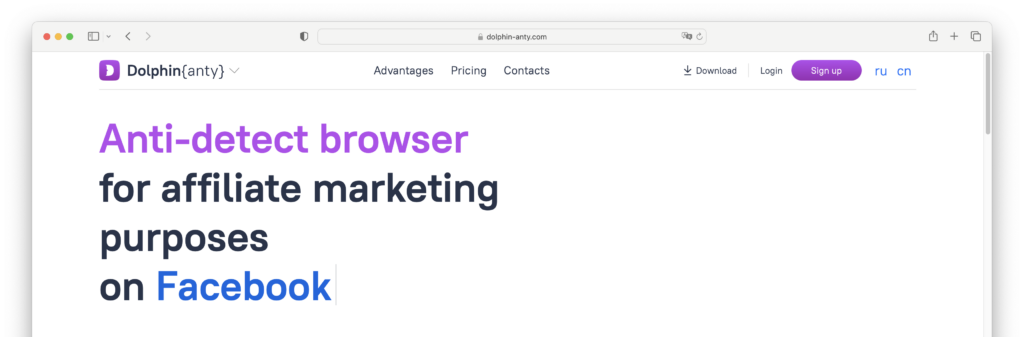
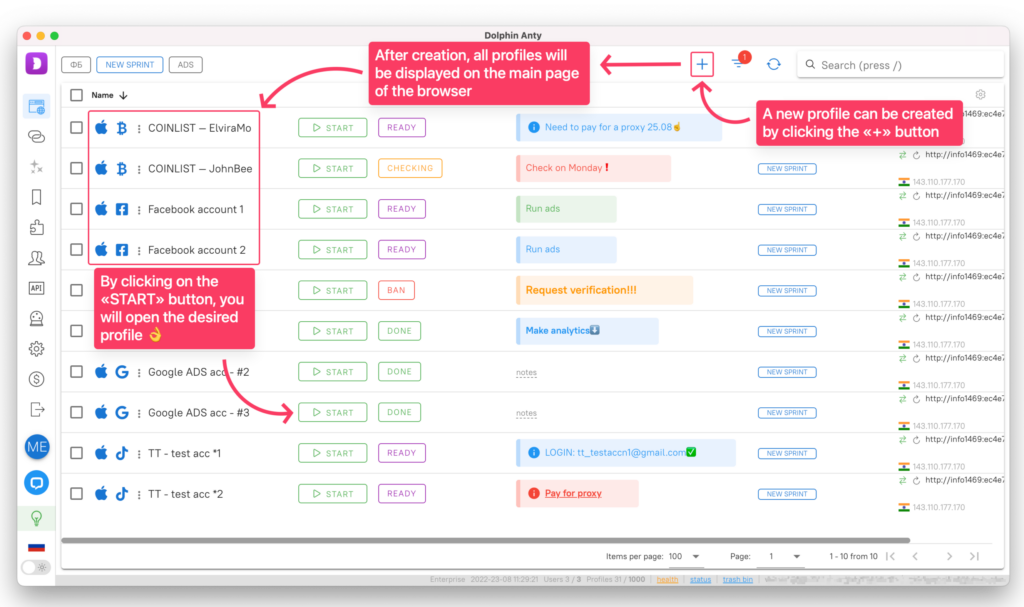
The Dolphin {anty} antidetect browser was originally intended specifically for affiliate marketing and traffic arbitrage. This is due to the fact that the creators themselves did affiliate marketing: they understand the pains and needs of this audience, so their tool is ideally suited for such tasks. Now the antidetect is adapted to work with cryptocurrency projects such as Coinlist, Huobi, etc.: it even has a separate CRYPTO profile.
Dolphin {anty} has the following advantages over other browsers:
- The browser is installed not only for Windows, but also Linux (AppImage format), MacOS and even MacOS on the M1 chip.
- A handy proxy and extension manager that allows you to add an unlimited number of proxies or extensions and then add them to your profiles with a single click.
- Support for SOCKS5 by username and password (those who are tired of buying flimsy proxies and getting banned will understand).
- Proprietary automation by created templates, as well as integration via API with Selenium, Playwright or Puppeteer tools.
- Well-thought-out teamwork with the possibility of issuing individual access for each team member. For example, one user can be given full control rights, while another user can only start and stop the profile.
- Mass management in a couple of clicks. You can mark desired profiles and then delete, modify proxies, export cookies or set tags on those profiles.
- There is a recycle garbage can feature from which you can restore previously deleted profiles without contacting support.
- Quick support right in the browser interface.
Dolphin {anty} is suitable even for complex resources like Google, Facebook and Coinlist. Dolphin{anty} has an intuitive interface. To create a new profile, just click on the required fields and select the data that interests you. You can attach tags to each profile, which will help speed up the work when searching for the necessary accounts.
In addition to the trial period, the Dolphin{anty} browser also has a completely free version with a limit of 5 profiles. At the same time, on all Dolphin{anty} tariffs, it is possible to purchase additional profiles, even on a free one.
Go to the Dolphin {anty} website and get 5 free profiles.
Plans:
- Free: 0$ (free up to 5 profiles);
- Base: $89 per month (up to 100 profiles);
- Team: $159/month (up to 300 profiles);
- Enterprise: from $299/month.
Get 20% off your first payment. Discount activates strictly via our link for any tariff plan. ⭐ Read our Dolphin Anty Review →
More Less2. ⚡🔐Vision — Fast Antidetect Browser with a 4-Day Free Trial
If you’re tired of software that requires studying a bunch of manuals, complicated settings and constant tech support, Vision is what you need. This browser is made according to the principle: not for yourself, but for users. The team of developers perfectly understands that not everyone is ready to spend a lot of time on testing, so they made a product that is as simple and understandable as possible from the first minutes. Vision is suitable for working with almost any platform – from Facebook, TikTok, and Google to Cryptoexchanges, Amazon, eBay.
Benefits:
- Uptime – Vision has only been unavailable to you for 7 minutes and 56 seconds in the entire year 2024.
- Real browser fingerprints that are collected from live users, so there can’t be any inconsistencies.
- New versions of the core appear almost immediately after the release of Chrome, and the project team is constantly communicating with its users and implementing many user requests.
- The only browser with support for UDP via SOCKS5 proxy, downloading from FB AdLibrary without extensions, saving and inserting 2FA inside profile, best on market HumanType and a lot of other useful features that speed up work.
- Speed and weight of the application – the load on the system is much lower with the same use case with any competitor.
- Flexible plans system, for any plan you can customize the right number of people in the team. As a VISION administrator, you can assign different roles to your team members, give unique statuses, manage notifications, folders, etc.
- Security – each account works in isolation without communicating with others, and all data is securely encrypted.
- Proxy encryption feature.
Plans:
- Micro: $29/month (50 profiles)
- Base: from $79/month (150 profiles + 2 team users)
- Standard: from $129/month (300 profiles + 2 team users)
- Pro: from $189/month (500 profiles + 4 team users)
- Max: from $289/month (1000 profiles + 4 team users)
- Ultra: from $389/month (1500 profiles + 5 team users)
A 4 day trial with full functionality is available.
3. 🔥 Undetectable — Antidetect Browser with 5 Free Cloud Profiles
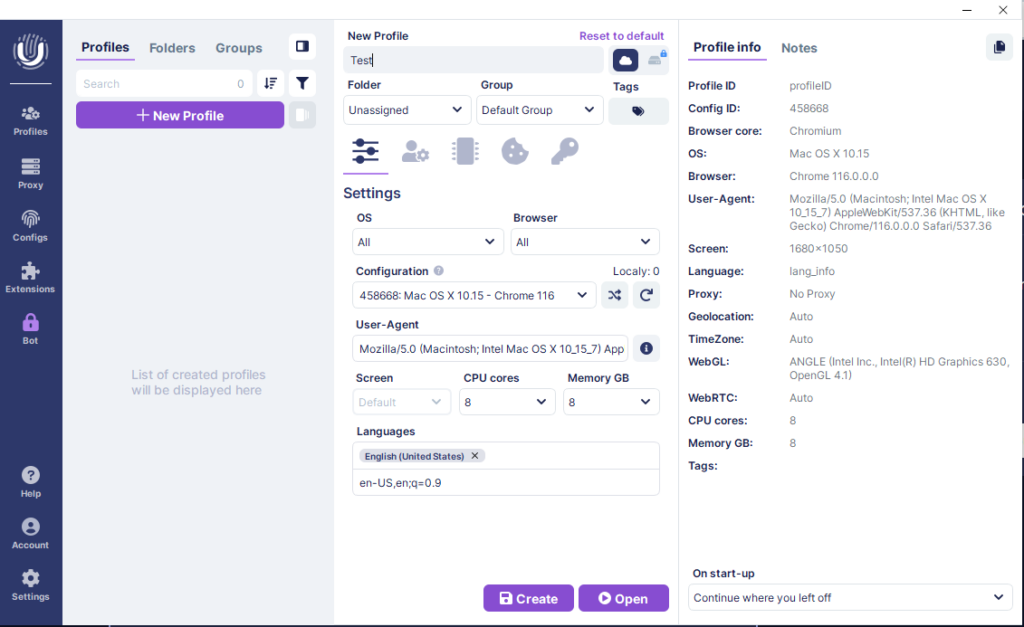
Undetectable anti-detect browser provides a high level of anonymity on the Internet and helps you avoid being blocked and detected on websites. The browser runs on 64-bit Windows 7 and above, as well as macOS. Browser will come in handy in the areas of: traffic arbitrage, E-commerce, Online Betting, Bounty & Airdrop.
Key benefits:
- ✅ Unlimited generation of browser profiles on any tariff. No limits on their number!
- ✅ Local storage of browser profiles without synchronisation with the server. Launch, delete, archive, rename profiles at any time.
- ✅Regular and fast updates of the Chromium core to the latest versions, just like regular browsers!
- ✅ 3 ways to store browser profiles. Store accounts locally on your device, in the cloud, or on your own server
- ✅ Bot for collecting cookies and generator of popular sites. Microservice allows you to generate randomised lists of the most popular sites according to the selected geography. Warming up profiles has never been easier! It is enough to open the cookie bot, select the profiles, the required country and the number of sites to be visited by the bot.
- ✅ Paste like a human. This feature emulates human behaviour when pasting text, creating a more realistic and natural browser experience.
- ✅ Instant launch and save. Undetectable can load over 5000+ profiles in a couple of seconds. Supports bulk cloud and local profiles.
- ✅ Over 33 permission settings for teamwork.
Visit the Undetectable IO website and get 5 free cloud profiles suitable for teamwork. Don’t forget to watch the video tutorial on how to use the browser.
Plans (per month):
- Free: 0$ free 5 cloud profiles (missing ones can be purchased)
- Base: 49$ below promo code -20%
- Professional: 99$
- Customisation of tariffs. Spend only on what you really need, for example:
- The Base subscription costs $49 and provides 1 user, 50 cloud profiles, 25 default configurations, and unlimited local profiles.
- If the number of cloud profiles and configurations is acceptable, you can purchase an additional user for $10. As a result, you’ll have 2 users for $59, instead of the $99 available only on the next Professional plan.
- This way, you save $40 and can work with a small team. When working solo, you can avoid overpaying for features you don’t use.
-20%
Undetectable Promo Code & Coupon
-20% discount on the first purchase of any Undetectable subscription. ⭐ Read our Undetectable Review →
More Less
4.👍Multilogin — antidetect browser with proxies for multi-accounting
Multilogin is an anti-detection browser created in 2015 to manage multiple accounts without the risk of being blocked. It is suitable for arbitrage, e-commerce, SMM, crypto, and Web3, bypassing restrictions on platforms such as Google, TikTok, and Amazon. Its simple interface and built-in features provide reliability and convenience for solo entrepreneurs and teams, ensuring peace of mind.
Key advantages:
- Proven technology, users share positive experiences every day.
- All in one: browser and residential proxies without third-party services (from 1 GB of traffic in the plan).
- Automation: AI-Quick Actions for quick profile creation and integration with Selenium, Puppeteer, Playwright.
- Teamwork: unlimited access with roles, cloud synchronization of cookies and extensions.
- Security: 2FA and 24/7 support in 5 languages.
- Flexible modes: Basic, Advanced, Expert for configuring 25+ digital fingerprint parameters.
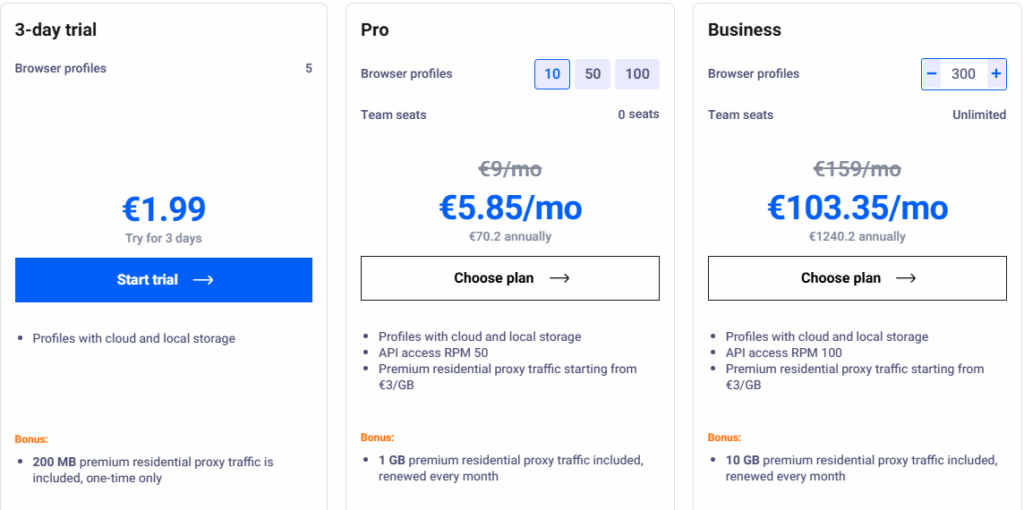
Previously, the Solo plan cost €99/month with no trial period, but now Multilogin offers an affordable trial plan for €1.99 for 3 days and a basic Pro 10 plan starting at €5.85/month with annual payment. This lowers the entry threshold, making the tool accessible to beginners and small teams.
- Trial: €1.99 for 3 days (5 profiles, 200 MB of traffic).
- Pro 10: from €5.85/month (10 profiles, 1 GB of traffic, annual payment).
- Business: from €300/month (unlimited, 10 GB of traffic).
Get a 50% discount on any plan for the first month. Valid for new users only. Paste code at checkout. ⭐ Read our Multilogin Review →
More LessCurrent Antidetect Browser List (2026)
The anti-detect browser market is constantly evolving, reflecting current user needs and technological developments. New players enter the market, existing solutions continue to improve, while some projects shut down or change their positioning. Prices also adapt to market conditions. That is why we regularly update our list of anti-detect browsers that are relevant in 2026.
Some projects fail to withstand the competition and eventually shut down for various reasons. Brovisor, Ultimate Orb, and Zibird Browser are examples of such projects. When the first performance metrics and financial projections are analyzed, it often becomes clear that the expected return on investment is lower than investors anticipated and that demand for the product is insufficient. Developers may expect rapid growth and high profitability, only to face a market that is already occupied by established players.
In my opinion, successfully developing an anti-detect browser requires more than simply building a good product and bringing it to market. It requires funding for continued development, a team of programmers capable of maintaining and improving the product over time, and, importantly, real-world use of the browser by the developers themselves. The last point is particularly important: when developers actually use their own product for traffic arbitrage, multi-accounting, or other tasks it is designed for, they can identify real-world problems faster and understand which features users genuinely need.
That is why, in my opinion, an anti-detect browser created solely as a commercial product for selling subscriptions is at a disadvantage compared with a project that evolves from the real-world needs of its own team. At the same time, having one highly skilled developer may not be enough: if critical knowledge about the product is concentrated in a single person, their departure can seriously affect the project’s future development.
On August 31, 2026, Indigo Browser will officially cease operations. Users have been offered the option to move to the Multilogin, which will take over ongoing support and the migration of Indigo users. In other words, Indigo will not continue to develop as an independent product: after that date, it will effectively disappear, and its users will move to another solution. I personally used Indigo Browser about ten years ago and considered it a quite capable solution at the time. That is why, for me, this is not simply the disappearance of another brand from the list of anti-detect browsers, but a telling example of why, when choosing such a service, it is important to look not only at its capabilities today, but also at the stability of the project itself and its ability to develop over the long term.
When choosing an anti-detect browser for a team working with a large number of profiles, it is worth paying attention to solutions that have stood the test of time. Reliability and security should come first in order to minimize the risk of information leaks. Functionality and ease of use are also important: the interface should be intuitive, while the feature set should be broad and flexible. Regular updates and active technical support are good indicators that the product is still being developed and adapted to new challenges.
Reading reviews from other users and industry specialists can also provide a more objective view of a product. However, I recommend looking beyond reviews: check when the latest updates were released, whether the official website is still operational, whether downloads and support are available, and whether the developer is continuing to invest in the product’s development.
If you specifically need a free anti-detect browser, pay attention to the number of profiles available on the free plan: the limits of free plans vary significantly between services.
Linken Sphere
Linken Sphere is based on the Chromium engine. Pricing for Linken Sphere starts at $30 per month, with no free trials. Payment, for the purpose of anonymity, is made only in bitcoins. Overall, Linken Sphere is a reliable and functional anti-detect browser that is suitable for both beginners and experienced users.
-10%
Linken Sphere Promo Code for Antidetect Browser (Lifetime 10% Off)
Get a permanent 10% discount on all purchases and subscription renewals. Enter code at checkout. ⭐ Read our Linken Sphere Review →
More Less
Incogniton — Free Plan with 10 Profiles
Incogniton browser is free with Starter tariff (10 profiles). Advantages of the browser: Excellent documentation in English and Russian. “Paste as human typing” function – emulation of manual text input. Automation of Puppeteer, Selenium. Mass creation of profiles. Monthly rates start at $29.99, the price is without tax (VAT) of your country. I used Incogniton before, now switched to Dolphin {anty}.
AdsPower Anti-Detection Browser ⚡ free with Free plan
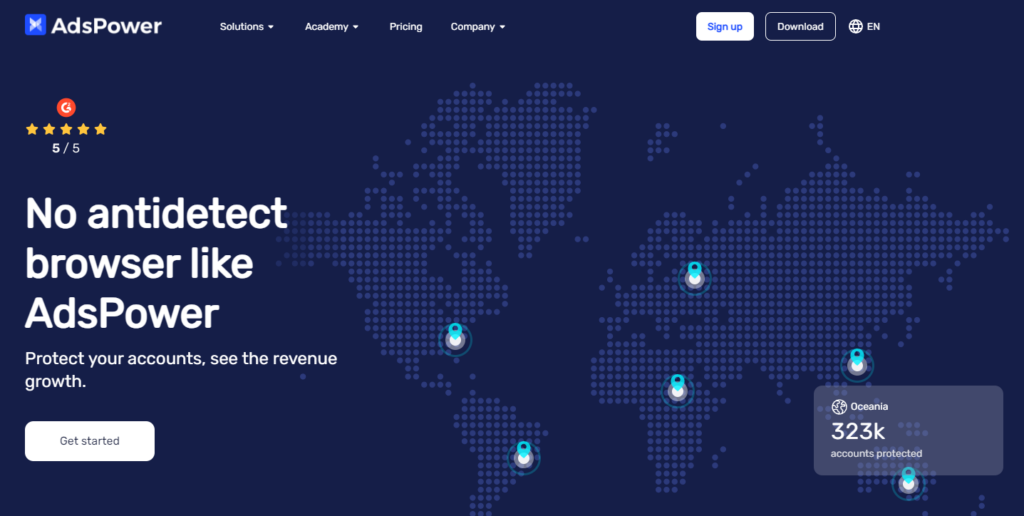
Modern anti-detect browser AdsPower for multi-accounting, created by programmers from Singapore . In-app and online tech support is available in English, Russian, Vietnamese and Chinese. AdsPower offers unique fingerprints to disguise each account so that they are perceived as independent individuals and thus avoid being banned. The team understands the importance of data security, so it provides excellent data encryption as well as data transmission encryption.
The main advantages of AdsPower that put it ahead of its competitors:
- Installed on Windows and macOS (including the M1 chip).
- AdsPower has prints of five operating systems in all versions: Windows, macOS, Linux, Android and iOS.
- Choice of Chromium or Firefox-based browser version.
- Any repetitive tasks can be automated in AdsPower. Special RPA robot that will do all the routine work for you – you can design your own task flows or use templates. There is an application center with plugins to extend the functionality.
AdsPower offers a free plan that includes 2 profiles. Paid plans start at $9/month or $5.4/month if billed annually (20% off annual payments). It’s interesting that AdsPower is the only one in the antidetect industry that offers a flexible pricing model. Its paid plans (the Base plan and the Pro plan) have many variants because their prices are not fixed and depend on how many profiles and members you choose. For example, you can choose a Base plan with 10 profiles and no additional members that costs $9/month, as well as a Base plan with 50 profiles and 3 additional members that costs $34/month. The difference between Base and Pro is that the latter gives access to all features, while the former contains only the essential ones. A 3-day free trial is available for paid plans.
Visit the AdsPower website and sign up for the Free rate to test your browser.
Plans (20% off annual payments):
- Free: $0 (free up to 2 profiles)
- Base: from $9/month
- Pro: from $50/month
- Custom: contact customer service
GeeLark — Anti-Detect Browser with Mobile Profiles
The GeeLark anti-detect browser is more accurately described as an anti-detect phone. GeeLark creates profiles that function as real Android devices running in the cloud. This allows you to use the key features of a smartphone without the need for a physical device.
GeeLark supports automation for TikTok, Facebook, Threads, and Instagram — from account warming to streaming and video editing. The website also has an extensive help section with guides ranging from quick setup to TikTok analytics automation.
To explore GeeLark’s capabilities, you can get 2 profiles and 30 minutes of cloud phone usage for free after registering for the service. No bank card is required, so you can test the core features of the service without making a payment.

Get a 20% discount on your first subscription. Valid for newly registered accounts only. ⭐ Read our GeeLark Review →
More LessDICloak Antidetect Browser – 🔥Start for Free!🔥
⚡The DICloak Antidetect Browser has become a global favorite for its unparalleled ability to efficiently and securely manage multiple accounts. Designed for professionals in social media management, affiliate marketing, traffic arbitrage, e-commerce, account farming, airdrops, and more, DICloak offers powerful features like RPA automation, bulk operations, and a window synchronizer. Additionally, it allows you to customize fingerprints and integrate proxies for each profile, ensuring top-level security and operational efficiency.
What Makes DICloak Stand Out:
- Manage 1,000+ Accounts on One Device: Stop wasting money on extra hardware! DICloak allows you to manage multiple accounts on a single device, cutting costs and boosting efficiency.
- Guaranteed Account Safety, No Ban Risks: Every account gets its own isolated browser profile with custom fingerprints and IPs, drastically reducing the risk of bans. Your accounts, your control!
- Flexible Proxy Configuration for Maximum Performance: Seamlessly integrate with all major proxy protocols (HTTP/HTTPS, SOCKS5) and manage your proxy pool with bulk operations. No more struggling with IP management—DICloak has you covered.
- Streamlined Team Collaboration for Better Results: Easily manage your team with advanced tools like profile sharing, permission settings, data isolation, and operation logs. Your team works smarter, not harder.
💸 Start with a Free Plan: Enjoy the Free Plan at $0, which includes 1 members and 5 profiles, and basic features to get you started risk-free. 💸 6 Premium Plans – Scaled for Every Business, read more in the DICloak browser review.
MoreLogin — antidetect browser with 2 free profiles
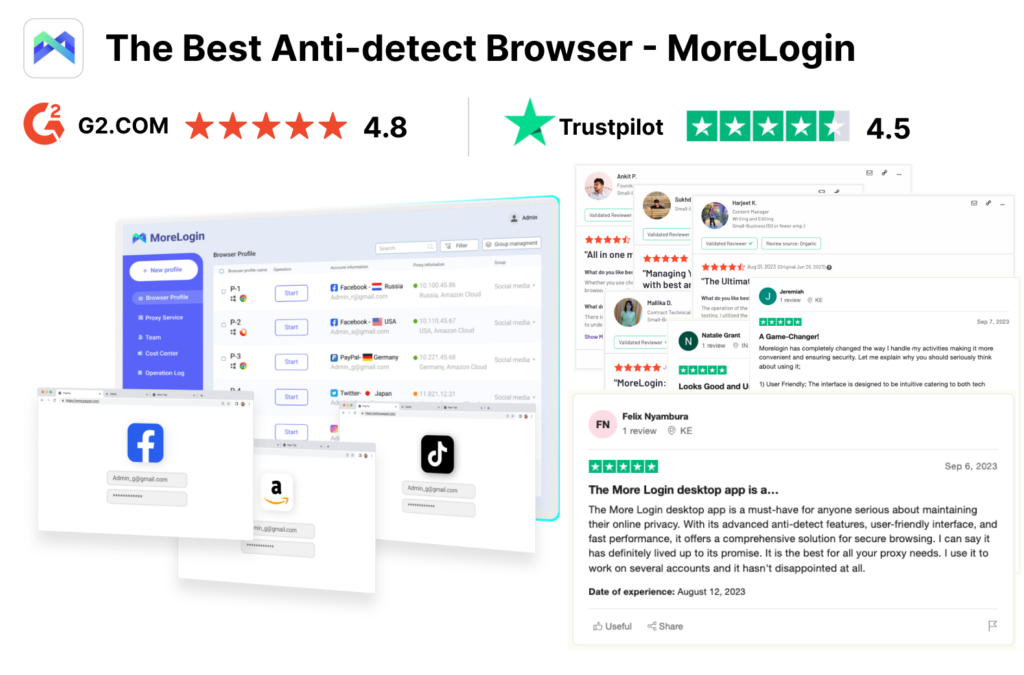
⚡MoreLogin’s anti-detection browser has gained popularity among global users and is widely used for managing multiple social media accounts, affiliate marketing, traffic arbitrage, ticketing, e-commerce, ect. And more as a modern and advanced fingerprint browser, MoreLogin’s unique Real Canvas Fingerprint technology sets it apart from traditional fingerprint browsers that only generate virtual canvas fingerprints. MoreLogin possesses superior technical capabilities, and tests have shown that using MoreLogin results in higher success rates on popular detection websites compared to other products.
👍Advantages of MoreLogin Leading the Industry:
- Secure Next-Generation Real Canvas Fingerprint Technology.
- User-Friendly Interface with Timely and Professional Customer Service.
- Browser Versions Based on Chromeium and Firefox Available.
- No Need to Search for Proxy Providers. MoreLogin Provides Clean Proxy Resources Worldwide.
- Offers Higher Levels of Privacy and Security, Allowing Data Storage Locally or in the Cloud Based on User Preferences.
- 7 Years of Fingerprint Browser Technology Expertise. Ensuring Stability and Smooth Operation
We highly recommend MoreLogin for its user-friendly interface, prompt and professional customer service, and flexible and cost-effective pricing strategy compared to other fingerprint browsers.
💸Pricing Plans:
Morelogin has only 2 prepared tariffs, the rest you create yourself using the builder on the website, which is very convenient and allows you not to overpay for unnecessary resources. Below is a free tariff and calculations for 10 and 150 profiles:
- Free: $0 (Permanently free with 2 profiles and 2 members)
- 10 Profiles: $7.2/month
- 150 Profiles: $32/month
- Customized plans are available on the official website.
Compared to other products, having 100 profiles with MoreLogin can save you at least $40 per month, and all plans include an extra member for free. In terms of pricing, MoreLogin offers the best value among fingerprint browsers.
User rating of the best antidetect browsers (table)
Anti-detect browsers are indispensable tools for those who work with paid traffic, especially in arbitrage. They help to manage multiple accounts, bypass platform restrictions and ensure data security. Such tasks require complex solutions, so quality tools are almost always paid. Free analogs, if they exist, are usually inferior in reliability and functionality.
This review has been around for several years, and we update it regularly to provide only relevant information. In 2025, we focused on modern browsers, removing from the list those that have lost relevance. Here we have created a ranking, which is formed not only based on the opinion of our team, but also on your ratings in the comments.
We want our rating review to express not only our opinion, but also take into account your experience of using a particular browser. Please note that user preferences for anti-detection browsers depend on language: English, Portuguese and Russian speakers choose different solutions. To make an informed choice, we recommend studying the user ratings of anti-detection browsers, in all three languages. This will give you a better idea of which solutions are the most popular and effective among users from different regions.
Dear users, thank you for sharing your experience!
We ask you to leave detailed and substantiated reviews – this helps others choose the right tool. If you complain about serious problems – indicate specific facts. We remind SEO specialists: write professionally and avoid empty laudatory epithets – the audience will immediately see through you. Your feedback makes our rating more useful for everyone. Thank you!
 | ||
 | ||
 | ||
 | ||
 | ||
 | ||
 | Promo code ❌ Free plan ✅🔝 | |
 | ||
 | ||
 | ||
 | ||
 | ||
 | ||
 | ||
 | ||
 | ||
 | ||
 |
Proxies for Anti-Detect Browsers
By using reliable proxy services, you can ensure a stable connection in an anti-detect browser and use a separate IP address for each profile. For multi-accounting, it is especially important to avoid having multiple profiles use the same IP address unnecessarily. Depending on the task, you can use residential, mobile, or datacenter proxies. Residential proxies generally appear to websites as connections from regular users, while datacenter proxies are often better suited for tasks where speed and cost are important, such as web scraping.
It is important to keep the following points in mind:
- Don’t cut corners when choosing proxy services, as their quality affects your security and anonymity.
- Before purchasing proxies, check reviews from other users and the provider’s terms for replacing non-working IPs.
- Avoid using the same IP simultaneously for a large number of independent accounts whenever possible.
- Choose the proxy location according to the account’s geographical location and the target platform.
- Test different proxies to find the ones that best suit your needs.
Conclusion or My Profitable Setup
A profitable bundle is a combination of an offer (product or service), a landing (prelending) and a creative that works in profit. But before you can find it, you must have software installed, proxies purchased and set up, which will allow you to make a profit. A bundle of software that I use to make a profit:
- Dolphin {anty} browser.
- Proxy for SEO tasks I prefer Astro, for other tasks I often use Proxy-Seller.
- Selection of the best spy services for analyzing competitors’ advertising and finding profitable connections.
Choosing a good anti-detection browser can be a daunting task due to the large number of options in the market. The browsers mentioned in this article are some of the best anti-detection tools available today.
Be sure to take the time to find the best anti-detect browser for you, and stay safe while surfing the web! I recommend Dolphin {anty}.



This is a solid, up-to-date lineup. When you’re running a media buying team, picking the right browser always comes down to seamless profile sharing, cloud sync stability, and fair pricing tiers for extra team seats. For anyone just starting out: don’t cut corners with sketchy, unknown software just to save a few bucks. If a strict anti-fraud system catches even one leaked parameter in the browser core, your entire account farm goes down, and those losses will heavily outweigh a monthly software subscription. By the way, if you don’t actually need industrial-scale multi-accounting and just want to protect your personal data for everyday surfing, check out the author’s comparison on the best secure browsers — it perfectly explains the difference between casual privacy and professional spoofing.
Thanks for this comprehensive list! Choosing a reliable software for multi-accounting is always a headache because of the anti-fraud risks. After reading your review, I’ve picked Multilogin and GeeLark to test out for my current campaigns. By the way, if you are just looking for regular privacy tools rather than professional spoofing apps, the author also has a great guide on the most secure browsers that is definitely worth reading.
i’ve used BitBrowser is very good
Can confirm about Multilogin, have been using it for 2 months and it works like a charm
Zibird antidetect browser must be show on it and its totally free
I have tried several proxy services like IPRoyal, Smartproxy, and Geonode over the past year. While they all work decently for my web scraping needs, I’ve consistently faced issues with them being detected by websites. NodeMaven has been quite effective in bypassing detection so far, but it’s still a relatively new service, so I’m keeping an eye on its long-term performance.
There are many other antidetect browsers out there that are worth trying. By the way, has anyone used antidetect browser Hidemyacc? I want to hear reviews about it
A pretty good antidetect browser. Profiles created by Hidemyacc avoid detection well. Incorporate automation features. You may need to warmup your account
Take a look on antidetect browser Hidemyacc. Highly secure data. My accounts use a combination of proxies and they work fine. I find it meets my needs and it is not inferior to the 4 anti-detect browsers you mentioned above
I think you need to take a look at ixBrowser, which is free antidetect browser and there is no limitation of creating profiles and group member seats.
I’m very surprised that the information about GoLogin is so lackluster. I have been using it for a long time both for personal purposes and for work, but I have never had any serious problems at work. Great support, stable browser and reasonable subscription price. But some other anti-detect browsers gave me some problems
I completely agree with you! The Antidetect browser helped me a lot. In my case it’s the Go browser. There are many benefits such as anonymity, tracking protection, blocking bypass, phishing protection, and working with multiple accounts. So I only use that. I hope this will help many people in choosing an anti-detect browser.
Bitbrowser is also good, I learned about it in a youtube video.
Dolphin anty is really the best browser I have ever used, I’m glad that he is in the first place here because it’s true, he is the leader and there is no doubt about it !!
Dolphin{anty} and AstroProxy proxies are the best solution for OnlyFans.
Has anyone used Antidetect Browser Genlogin? Please give me more reviews to decide to upgrade the package with, I am using the free profiles package
I found antidetect hidemium to be the cheapest, works well with maz, ebay, facebook, gmail…
I didn’t find a free plan.
Which of the anti detect browser works perfect for CPA marketing network. Any ideas or suggestion?
The anti-detect browser itself solves only part of the problem. Choose the browser that you are comfortable with. A combination of programs is important, at least a browser + proxy.
Thanks for browser and proxy review – very helpful. Proxy from PQ is godsend!
Multi login should be in this list. Or Hidemyacc I’ve just tried, it’s also a alternative.
Thank you for the addition. Use Indigo instead of Multilogin. Why pay more? Hidemyacc added to complete the list.
MarketerBrowser is the cheapest one
It doesn’t have a free offer
Hey do you know good antidetect for chaturbate site? is videochat. Need to get more traffic in the room
In my opinion, the important thing here is a combination of anti-detect browser and the right proxy. Try Dolphin and a proxy from Astro. They are free.
I really liked Dolphin anty, I advise everyone to try it. Perfect for Facebook ads and coinlist! the functionality is powerful and at the same time convenient, like the developer
For coinlist better to use Octo Browser, works like a charm
I use Logii. It’s the best one in my opinion. Should have been on this list.
Lalicat Browser should be in this list.
Added to general list.
Thanks very much.
True Antidetect Browser — Free Antidetect Browser
nevep.ru/true-antidetect-browser/