

MobileProxy.Space A Comprehensive Review of Mobile, Server, and Backconnect Proxies for Practical Use
12.00$
Mobile proxies with real SIM. MobileProxy.Space is a major international service that rents out private mobile proxies. Simply put, it is a technology platform that allows users to access the internet via mobile carriers’ base stations (4G/LTE/5G) in dozens of countries around the world, masking their actual computer or server as a regular smartphone.
Description
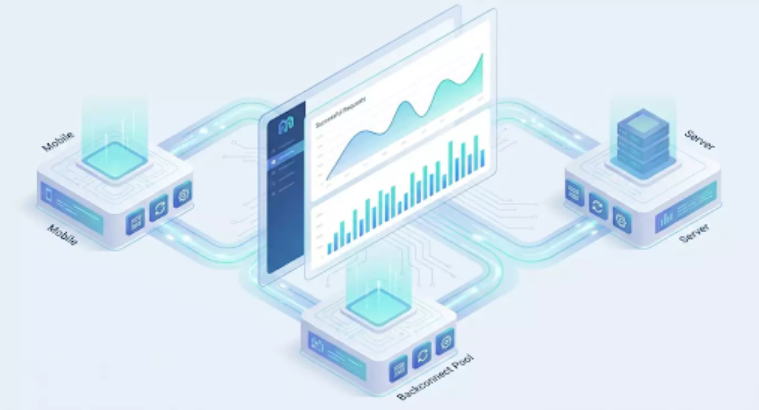
In 2026, marketing teams, data analysts, and e-commerce must navigate high demands for data quality, speed, and compliance with platform regulations. We need to gather market insights, test ads across cities, manage client accounts, track prices, and monitor search results, all while operating correctly: adhering to regulations, following legislation, and maintaining project environments and identities separately. The main practical issue here isn’t the technical complexity of parsers or advertising accounts. It’s about having a reliable network layer that is stable, manageable, predictable, and scalable without surprises. Proxies serve as the foundation for this layer. Three things are necessary: mobile IPs with a high level of trust within networks, powerful server proxies for volume and speed, and backconnect pools for flexible rotation under high parallelism. MobileProxy.Space addresses this triad through a single dashboard, minimizing session drops, sudden blocks, and discrepancies in geolocation data. This review presents the service through the lens of practicality: step-by-step scenarios, metrics, common mistakes, and life hacks to ensure you achieve predictable results and recoup your infrastructure costs instead of wasting budget on emergency solutions.
Service review: Key Features and Advantages
Types of Proxies: mobile (4G/5G), server (data center), backconnect (single entry point with an IP pool and deep rotation). Supports HTTP(S) and SOCKS5 protocols, login/password authentication, and IP whitelist access. Sticky sessions with managed TTL, planned and triggered rotation, API access, and dashboard management are available.
What Matters Practically:
- Mobile Proxies: authentic ASN operators, high \”trust\” for network traffic, flexible IP switching by schedule or API. Suitable for targeted access, nuanced SMM tasks, and geo-relevance checks.
- Server Proxies: high bandwidth and low latency for extensive scraping, API requests, and data exports. Cost-effective for large volumes and stable traffic patterns.
- Backconnect Pools: one entry point — thousands of output IPs with on-demand rotation, by timer, or in response to codes. Ideal for aggregation, mass crawling, load distribution, and A/B access strategies.
Technical Details (Briefly):
- Sticky parameters: IP retention per session with TTL from 1 to N minutes.
- Rotation: by interval, by event (response code, timeout), manual via API.
- Concurrency: configurable thread count, limits on simultaneous connections, error profiling.
- Filters: country/city selection (if available), ASN type, pool.
- Logs: statistics on response codes, average response time, distribution of TTL and session durations.
- Integrations: standard clients and libraries (cURL, Python requests, Playwright, Puppeteer, Scrapy), as well as drivers for HTTP/SOCKS5.
Business Benefits: managed and reproducible networks, clear billing, reduced manual restarts, increased successful request rates, and savings on downtime for teams that depend on stable data. The difference is especially noticeable in projects with multi-geography and multiple contractors, where a single proxy provider reduces chaos.
Scenario 1: SMM and Management of Multiple Client Accounts
Who and Why
For agencies and in-house teams managing multiple client profiles on social media and messaging platforms. The goal is to separate the network context of projects, ensure stable access, properly conduct geo-tests on content display and ad formats, and distribute rights among staff without session overlaps. We are not discussing violations of platform rules — only legitimate operations with client accounts and content.
How to Use
- Create a separate mobile proxy profile for each client project. In the dashboard, specify the project name, responsible parties, and environments (prod/staging).
- Enable sticky sessions with TTL of 10-20 minutes for manual moderation and publications. This will reduce the likelihood of unnecessary authorizations.
- Implement IP whitelisting for the office and company VPN gateways, while using login/password authentication for freelancers.
- Disable WebRTC leaks and account synchronization in browser profiles. Store cookies separately for each client.
- For content geo-tests, choose mobile proxies from the desired city or the nearest available region. Enable scheduled rotation every 2-3 hours.
- For automation scenarios involving content plans, integrate the rotation API to refresh IPs before overnight automated posting.
Case Study and Metrics
An agency managing 18 clients distributed 18 mobile points, set sticky sessions to 15 minutes, and implemented whitelisting. Over 30 days: 0 critical session overlaps, 27% fewer repeated logins, and content moderation time decreased from 9.5 to 6.8 hours per account manager. Conversion rates for outreach during geo-tests increased by 11.4% due to accurate localized display and reduced publication disruptions.
Life Hacks and Best Practices
- Create a network map: which project — which proxy — which performers. This promotes discipline and speeds up audits.
- Do not mix mobile and server IPs in one social media profile: maintain signature stability.
- For highly engaging content, extend TTL to 30-40 minutes to avoid losing sessions during peak activity times.
Scenario 2: Price and Assortment Scraping in E-commerce
Who and Why
Retail and marketplace analysts, pricing departments, competitive intelligence, BI teams. The goal is to regularly collect available prices, availability, promotions, and characteristics from open pages to update pricing engines and reports. A high success rate is essential, alongside ethical practices: careful mode, pauses, correct headers, and no aggression toward servers.
How to Use
- Classify sources as \”requiring mobile IPs\” (sensitive to trust) and \”resistant to server IPs\” (catalogs, static, API with limits). Assign mobile proxies to the first and server proxies to the second.
- For mass exports, enable a backconnect pool. Set rotation: for each new request or every 1-2 minutes, plus fallback for 429/403 response codes.
- Configure an adaptive adapter: reduce frequency when error rates rise, and return to normal when stable. This is easy to implement in a scraper using Scrapy/Playwright.
- Use sticky sessions for product cards, but rotate them between cards. This will reduce \”jumps\” in content on one page.
- Log response codes, delays, RateLimit headers, and captcha dynamics. Store aggregated metrics in BI and build alerts.
Case Study and Metrics
A retailer with a price list of 120,000 SKUs switched to a combination: mobile for 9 \”sensitive\” sources, server for 18 \”resistant\” ones, and a backconnect for 100 threads. The success rate of requests increased from 82% to 96.3%, and the average cycle time decreased by 23%. Data accuracy (based on inventory and price verification) climbed to 98.7%. Budget savings on repeated passes accounted for 18% of the monthly volume.
Life Hacks and Best Practices
- Keep an eye on geo differences: prices and availability may vary. Mobile IPs will help you view local displays where relevant.
- Mix User-Agent pools and plausible Accept-Language headers based on region.
- Don’t try to increase flows by brute force. It’s better to improve pausing and sticky policy than to face an overall drop in quality.
Scenario 3: Ad Verification and Creative Geo-Testing
Who and Why
Media agencies, performance channel marketers, production creatives. The task is to check how ads and landing pages display to users in different cities and across mobile networks. Key factors: alignment with target geographies, landing page accuracy, and no conflicts with local validation.
How to Use
- Select mobile proxies from the desired region. For rare locations, use nearby nodes and document this in your testing methodology.
- Create a checklist: banners, formats, tracking parameters, redirects, pixels, and load speed.
- Set sticky sessions for 10-15 minutes on the creative. Take screenshots and HAR logs with identical browser profiles.
- Avoid artificially speeding up rotation: reproducibility of results on one IP is essential for a single view session.
- Enable the rotation API to change cities during regression testing.
Case Study and Metrics
An agency tested 52 creatives in 7 cities. With a fixed sticky session of 12 minutes and city rotation via API, reproducible bug rates rose from 61% to 89%. They identified 14 local redirect errors and 3 cases of tracking delay. The time for a full run dropped from 9 hours to 5 hours and 40 minutes, thanks to automated IP switching and checklists.
Life Hacks and Best Practices
- Document check hours: ad networks sometimes alter targeting based on the time of day.
- Use the same set of browser extensions to avoid noise in results.
- If creativity depends on mobile speed, gather RUM metrics on the testing view side.
Scenario 4: SEO and Local SERP Monitoring
Who and Why
SEO teams from agencies and in-house. They require honest local SERPs and snippets, checks for widgets, map blocks, local packs, and links. Mobile IPs provide a view close to that of a real user, while server proxies serve volume where geo factors are minimal.
How to Use
- Segment semantics: drive locally dependent queries through mobile IPs from target cities, brand and generic queries through server proxies.
- Enable sticky sessions for one request block (1-2 minutes). This will prevent SERP \”jumps\” due to rotation.
- Collect HTML and screenshots of search results. Parse positions, additional SERP elements, and timings.
- Conduct a benchmark weekly: the same query through a different type of IP to monitor data stability.
- Integrate findings into BI and correlate with position/CTR/conversion by city.
Case Study and Metrics
A service website with 240 local landing pages connected mobile IPs for 18 cities and server proxies for general queries. Over 8 weeks: local snippet match accuracy rose to 97.2%, running deviations in positions decreased by 31%, and 6 cities improved CTR by 9-14% thanks to accurate SERP assessment and meta block revisions.
Life Hacks and Best Practices
- Store \”raw\” snapshots of search results. They are needed for auditing disputed cases and training new staff.
- Monitor response codes and redirects. Sometimes, regional pages respond differently during peak hours.
- Avoid mixing mobile and desktop user agents in the same request batch.
Scenario 5: Marketplaces — Positions, Listings, Logistics
Who and Why
Sellers and marketplace analysts, operational teams. The goal is to verify available elements of listings (prices, options, content), local positions based on keywords, view promotional widgets, and assess the impact of logistics parameters without violating platform rules.
How to Use
- Assign mobile IPs for specific regions where demand is sensitive to delivery/pickup.
- Server pool — for general catalog queries to quickly gain a base matrix.
- Implement backconnect with request rotation for extensive search results while using sticky for viewing a single listing.
- Plan \”quiet windows\” for data collection to avoid peak load times on platforms.
- Compile all data into a showcase with regional and IP type annotations used for the results.
Case Study and Metrics
An electronics seller tracked 420 SKUs and 1,300 keywords across 5 cities. On MobileProxy.Space, they configured mobile for 5 cities with a 3-minute TTL per listing, server for the catalog, and backconnect for search results. The outcome: 95.5% successful requests, 17% increase in position accuracy, and 22 hours of manual verification saved each week. They identified 4 instances of incorrect pricing on regional showcases and resolved them within a day.
Life Hacks and Best Practices
- Maintain a directory of \”region → proxy pool\”. This will speed up discrepancy investigations.
- Avoid checking the same query too frequently. Instead, distribute requests evenly and include pauses.
- Always record listing versions and metadata: sometimes, CDN content updates occur in stages.
Scenario 6: Testing Mobile Applications and APIs
Who and Why
QA teams, developers, DevOps. There is a need to reproducibly test mobile flows (registrations, payments, onboarding), check API behavior under different network conditions and cities, and validate server rules and feature flags correctly.
How to Use
- Set up a test environment and link a mobile proxy with the desired region for emulators/real devices.
- Enable sticky for 20-30 minutes for a complete flow to avoid losing state between steps.
- Add backconnect in API load tests: rotation based on code 5xx/429 and per request, with 50-200 threads based on the profile.
- Collect logs with correlation by proxy session_id and test case to analyze anomalies later.
- Integrate IP switching through API in the CI/CD pipeline before e2e runs.
Case Study and Metrics
A fintech team tested onboarding and payments in 4 regions. With sticky for 25 minutes and emulations of various network delays, they found 7 defects related to regional rules and 2 \”floating\” API timeouts. The average bug reproduction time was reduced by half — from 80 to 39 minutes. Load tests through backconnect helped identify degradation at 120 rps for just one cluster.
Life Hacks and Best Practices
- Stabilize the environment: fix application versions, feature flags, and rotation policy during regression.
- Don’t mix real user telemetry with test telemetry.
- Conduct a control run on server IPs to exclude artifacts of the mobile network.
Scenario 7: Social Media Analytics and Content Planning
Who and Why
Content marketers, SMM analysts. The goal is to collect available analytics from pages, accessible hashtags, collections, and sections with open statistics for editorial planning while adhering to platform rules and frequency limits.
How to Use
- Assign mobile IPs for targeted queries where \”user view\” is crucial.
- Use server proxies for summaries and histories, where speed and volume are critical.
- Build a queue: when 429 codes rise, decrease frequency, switch to backconnect with event-driven rotation.
- Keep sticky for 2-5 minutes on one collection so that content doesn’t \”jump\” between list elements.
- Link the end results with the publication plan and A/B creatives, checking for overlaps in themes by city.
Case Study and Metrics
The content department managed 9 public pages and prepared weekly plans. After implementing MobileProxy.Space and source polling regulations: 94.1% successful responses, 15% fewer manual content adjustments, and a 12% increase in average engagement rates in cities where topic suggestions were gathered using mobile IPs.
Life Hacks and Best Practices
- Be aware of discrepancies in available blocks between feeds. Record the source and time of polling.
- Try to use \”windows\” with low load to avoid impacting peak periods on platforms.
- Do not duplicate collections for the same object more often than necessary for the editorial team.
Comparison with Alternatives: Why MobileProxy.Space is More Convenient
Compared to conventional data center proxies only: mobile IPs often receive higher trust from platforms, which is crucial when matching the \”real user experience\”. Server proxies are good for volume — and they are available in this service too. It’s essential to have both types in one panel and be able to flexibly combine them.
Compared to residential proxies without backconnect: without a convenient backconnect gateway, it’s challenging to scale flows, manage event-driven rotation, and centrally access metrics. MobileProxy.Space offers a pool with request rotation, sticky sessions, timings, and API management.
Compared to \”disparate\” providers: different billing, varied policies, and little statistics. A unified service reduces uncertainty, accelerates team training, and lowers maintenance costs.
Technical Advantages: flexible sticky sessions, event-driven rotation, support for HTTP/SOCKS5 protocols, whitelists and login/password options, clear logs by response codes, and integrations with popular automation tools.
FAQ: Frequently Asked Practical Questions
1. What to choose for nuanced SMM tasks — mobile or server?
For precise user experience matching and geo-tests — mobile. For mass and less sensitive tasks — server. It’s best not to mix signatures on a single project.
2. How to set up rotation without losing a session?
Turn on sticky sessions with TTL of 10-30 minutes for manual operations, and initiate rotation between tasks or through API. Avoid triggering rotation during critical actions.
3. When is backconnect necessary?
During mass scraping and load tests. Backconnect manages the IP pool through a single point, handles event-driven rotation, and supports high parallelism without manual gymnastics.
4. How to comply with platform rules and ethics?
Use a reasonable frequency, pauses, correct headers, respect robots and regulations. Only work with accessible data without authorization where allowed. Do not use the service for illegal purposes.
5. What protocols are supported?
HTTP(S) and SOCKS5. Choose based on your tech stack. For browser automation, HTTP(S) is often more convenient, while SOCKS5 suits low-level clients.
6. How to manage access within a team?
Whitelist for office IPs and gateways, login/password for remote workers. Divide projects and assign responsible parties in the dashboard.
7. What to do with captchas and 429/403 errors?
Reduce frequency, switch to backconnect with event-driven rotation, increase pauses and adhere to platform policies. Request data carefully and in measured doses.
8. Can it integrate with CI/CD and parsers?
Yes. Control rotation via API, store credentials in secrets, and connect Playwright/Puppeteer/Scrapy. Log response codes and latency into your metrics.
9. How to choose TTL for sticky?
For manual actions — 10-30 minutes, for product cards — 2-5 minutes, for quick results — 1-2 minutes. The key is not to overlap IP changes within a single logical step.
10. When may mobile be excessive?
If the task is mass collection of static data without geo-sensitivity, using server IPs or backconnect is more rational, saving budget.
Conclusions: Who It’s Suitable For and How to Get Started
MobileProxy.Space in 2026 is a practical service for teams that value the predictability and scalability of their network layer: marketing and SMM, e-commerce, SEO, QA/development, analytics. The key strength is the combination of high-trust mobile IPs, fast server proxies, and backconnect pools for parallel processing. You gain flexible sticky sessions, interval and event-driven rotation, transparent logs, and integrations with your tech stack. Start small:
- Outline tasks and categorize them into \”precise\” (mobile) and \”mass\” (server/backconnect).
- Set up for the project: IP type, sticky TTL, thread limits, rotation schedule.
- Enable logs and alerts for response codes, delays, and anomalies.
- Conduct a pilot over 2-3 weeks using A/B configurations for rotation.
- Document the regulations for the team: who connects to which proxy, how to change IPs, and where to monitor metrics.
From this step forward, your network layer will become a growth tool rather than a source of random failures. You will be able to scale data collection, ad verification, SEO, and marketplace analytics smoothly.









Owen –
It’s very convenient that you can change your geo without buying a new subscription; other services don’t have this feature.