

Web Hosting Hostinger
Hostinger – cheap premium hosting with website builder and professional online support. Hosting control panel hPanel, proprietary, easy enough to manage. Managed WordPress Hosting.
Description
Hostinger is an entry-level web hosting provider offering affordable introductory rates, an intuitive hPanel interface, and reliable shared performance for light websites. It fits beginners, small WordPress blogs, and budget-conscious creators launching a web project. However, it falls short for resource-heavy applications, users needing root access flexibility, or long-term budget planners facing massive year-two renewal price increases (often spiking up to 300%). If your project scales beyond basic web hosting or requires fixed-cost, high-performance server hosting, alternative VPS providers are a smarter choice.
What is Hostinger?
Hostinger is a global hosting provider known for its budget-friendly entry points and proprietary hPanel dashboard. It offers services ranging from shared web hosting and hostinger website builder packages to managed hostinger wordpress hosting and basic virtual servers. Headquartered in Lithuania, the company targets non-technical users looking for simple website deployment options with localized data centers worldwide.
Who Hostinger is Good For
- Beginners & Small Sites: Ideal for users launching their first blog or portfolio using Hostinger hosting plans with step-by-step setup guides.
- WordPress Users: Excellent for basic WordPress installs requiring automated updates and simplified caching plugins.
- DIY Creators: People using the hostinger website builder to build simple online presences without writing code.
- First-Year Budget Projects: Perfect for low-risk testing where the ultra-low initial price fits short-term experimentation.
When Hostinger Might Not Be the Best Choice
- Renewal Shock: Hostinger drastically inflates renewal rates after the initial multi-year promo period ends.
- Heavy Resource Demands: Large e-commerce stores or high-traffic apps easily hit Hostinger plans’ strict CPU/RAM limits.
- Advanced Server Needs: Developers who require full bare-metal performance, specialized OS templates, or dedicated server hosting will find the shared ecosystem restrictive.
- Fixed Budget Planning: If unexpected price hikes after year one hurt your business model, transparent flat-rate providers are better.
Key Advantages
- User-friendly hPanel replacing complex cPanel layouts.
- Low initial sign-up costs for long-term upfront commitments.
- Solid uptime and integrated light-caching features for simple web pages.
- Integrated AI tools within the hostinger website builder platform.
Potential Disadvantages
- Steep price jumps upon plan renewal (the primary complaint from long-term users).
- Aggressive upselling inside the control panel during billing and domain add-ons.
- Limited phone support; assistance relies entirely on live chat queues.
- Entry-level VPS options lack advanced management flexibility found on specialized cloud platforms.
When to Consider an Alternative
Consider moving away from Hostinger if your first-year promotional rate is expiring and renewal prices increase significantly. You should also switch if your traffic requires dedicated hardware resources, your application demands full root access customization, or you are looking for transparent billing without upselling tricks.
| Hosting Provider | Ideal Use Case | Key Advantage |
| is*hosting | Offshore & International Projects | Flexible offshore locations and privacy-focused server hosting. |
| Fornex | European & Regional Websites | Fast NVMe storage nodes with strong European network connectivity. |
| Cloudways | Scaling Cloud Applications | Fully managed cloud infrastructure built on top of AWS, GCP, and DigitalOcean. |
| Zomro | High-Resource Budget VPS | Ultra-affordable dedicated VPS resources with high bandwidth limits. |
Frequently Asked Questions
How to log in to the Hostinger control panel?
Go to Hostinger’s main website, click “Log In” in the top right corner, and enter your credentials. You can also sign in directly using connected Google or social media accounts to access your hPanel dashboard, manage domain names, edit billing setups, or open customer service tickets.
Where is Hostinger webmail located?
Access your email by navigating to the “Emails” section inside your hPanel account. Click “Manage” next to your active domain name, then choose “Access Webmail.” Alternatively, type mail.hostinger.com directly into your browser address bar and log in with your specific email address and account password.
What to do if your Hostinger website is not loading?
First, clear your browser cache or try viewing the site in an Incognito window. Next, log into your account dashboard to ensure your hosting subscription and domain renewal payments are current. Check Hostinger’s official status page to verify if your server node is experiencing temporary maintenance outages.
How to migrate a website to Hostinger?
Hostinger provides an automated migration request form within hPanel under the “Migrate Website” menu. Submit your previous hosting control panel login details or site credentials, and their technical support migration system will transfer your files and databases over without technical setup fees.
Does Hostinger offer free web hosting?
Hostinger does not offer direct free tier options on its main service; however, it sponsors a zero-cost partner platform named 000webhost for testing purposes. For main hostinger hosting plans, you must choose a paid subscription, though they back new purchases with a standard 30-day money-back refund guarantee.
What VPS options does Hostinger offer?
Hostinger offers entry-level unmanaged VPS servers powered by KVM virtualization. While suitable for simple setups, developers requiring custom cloud deployments, scalable storage, or flat pricing often find specialized server hosting providers deliver superior compute power without high renewal costs.
Hostinger remains a solid entry-level choice for short-term projects and absolute beginners who want cheap initial hosting and easy site builders. However, if you want to avoid renewal price shocks or require robust server infrastructure, moving to a developer-friendly VPS alternative before year two is the smart choice.
Hostinger was founded in 2004 in Larnaca, Cyprus. Hostinger brand appeared in 2011 and passed ICANN accreditation in 2014. Before that time, the creators of Hostinger launched hosting projects in 2007 000webhost.com and in 2008 hosting24.com. In 2013, Hostinger launched a company in Indonesia under the brand Niagahoster.co.id. In October 2014, a company was launched in Brazil and a local brand, hosting provider weblink.com.br.
In 2019, Apache servers were changed to LiteSpeed (LSWS) to improve server performance. In mid-2020, Hostinger partnered with the Google Cloud platform.
Where the Hostinger data centers are located
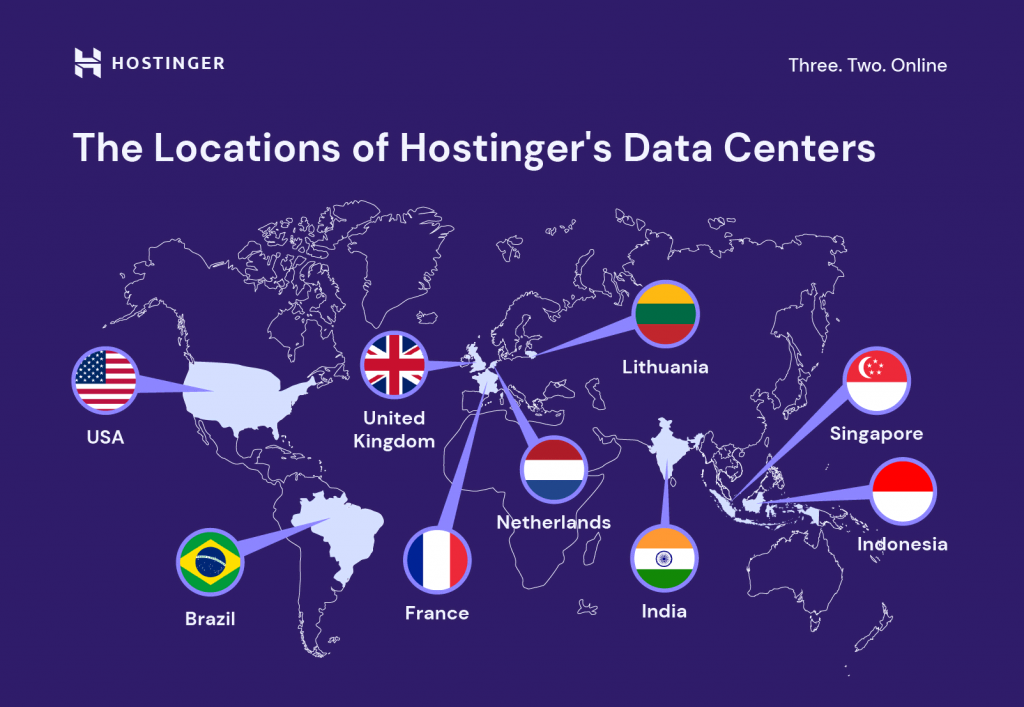
Data centers with Hostinger servers are located in the USA, Europe and Asia to ensure maximum speed and data security for you. Servers are connected to 1000 Mbit lines, which gives maximum speed for you.
Servers are installed in such countries as: Lithuania, Netherlands, Great Britain, USA, Singapore, India. Also Brazil and Indonesia, but they are available only for those regions – which means that if you want to order hosting in Brazil then you should register at the local website hostinger.br, respectively hosting in Indonesia at hostinger.co.id.
Pros and cons of Shared Hosting Hostinger
Pros of virtual hosting LiteSpeed (LSWS):
- Built-in free cache manager – you can forget about WordPress caching plugins. The cache works by storing static site content on extremely high-speed cache servers. This allows you to bypass PHP queries and display each page as quickly as possible. The cache is cleaned every 30 minutes.
- The BitNinja scanning system is constantly working on the servers and can delete files if their signatures are added to its database as malicious or the code of the file is known to be encoded and can not be opened and analyzed by the system.
- Protection against DDoS attacks
Cons of shared hosting:
- Web server logs are not maintained, according to Hostinger, to improve the performance of the server. For some tasks of website SEO promotion the absence of logs is unacceptable. Workarounds or move from shared hosting to VDS/VPS or use Google analytics and Google Console to analyze HTTP responses (404, 301) of your site.
- Significant increase in prices after renewal of the service.
Prices, hosting plans, discounts
Low initial prices. Hostinger offers customers a large number of different types of hosting services:
- Virtual hosting: $0.99 – $3.99 per month.
- WordPress: 2.15 – 14.95 $ per month.
- Site builder: 2.79 per month + 3 months free
- VPS hosting: 3.99 – 77.99 $ per month.
- Cloud hosting: 7.45 – 37 $ per month.
- Windows VPS: $26 – $250 per month.
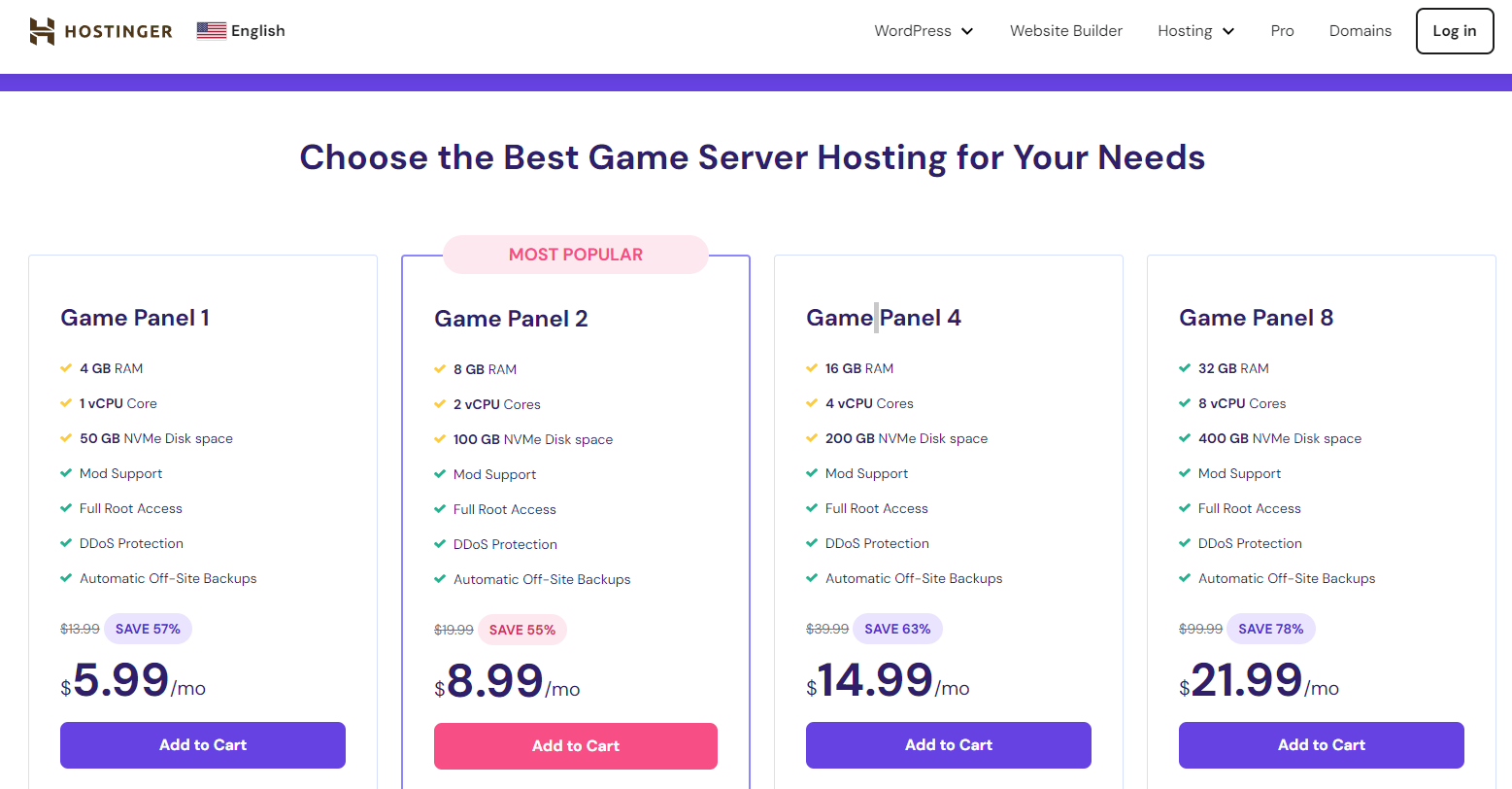
- Minecraft Game Hosting: 6.95 – 15.95 $ per month.
- Domain Registration.
You can see the current prices in your currency on the Hostinger website.
Hostinger game servers: your key to a smooth gaming experience
Hostinger offers game servers optimized to provide a smooth and immersive gaming experience, such as Minecraft, RUST. If you are looking for reliable and productive game hosting, check out the Top 3 Best Game Hosting, where Hostinger ranks among the top.
Video guide for beginners: How to register with Hostinger and set up a VPS for Minecraft
Hostinger AI website builder
Hostinger Website Builder: the best for creating unique websites quickly:
- AI tools to simplify website building
- Powerful features for online sales
- 140+ professional templates
Hostinger Website Builder provides an incredibly high level of creative freedom, while being very easy to use. On top of that, Hostinger website builder is very fast. Its best features are an intuitive drag-and-drop editor with a Russian interface, as well as a wide range of ready-made templates. This means that it will take no more than an hour to create a website from an idea to a website. And thanks to Hostinger servers, you can be sure of high speed.
Hostinger also always tries to help users whenever possible. The website builder provides powerful tools to help at all stages of website creation, starting from generating templates with the help of AI to filling the website with original content with the help of AI.
If you want to create a website for online shopping, Hostinger is immediately ready to provide you with widgets for categories, booking, discounts and even marketing. And since it provides only one fairly affordable plan, Hostinger website builder is one of the most inexpensive solutions for creating a website for online commerce.
Contacts Hostinger
- Website: hostinger.com
- Company: Hostinger International Ltd is registered in Cyprus.
- Founded: 01.11.2004
Support language: English, Russian
Central office Hostinger International Ltd:
- country: Cyprus
- city: 6023 Larnaca
- address: 61 Lordou Vironos Street
Contact Information:
- phone: no, communication through the ticket system and chat after registration on the site.
- email: ru@hostinger.com
- social networks: X (Twitter).
Management:
- Position: Chief Executive Officer
- Full name: Balys Krikščiūnas
Company’s branches Hostinger, UAB:
- country: Lithuania
- city: Kaunas, 44192
- address: Jonavos g. 60C
Number of staff: more than 400
Payments: Bank cards(Visa, MasterCard, American Express, Discover, JCB, Maestro), PayPal, Coingate (cryptocurrency payments), Google Pay.
Clients: more than 29 million users served in 178 countries.

- Online website virus check: international services and protection against hacking - 29.10.2026
- Best Proxy Providers for Web Scraping: How to Choose by Target, Session Type, and IP Quality - 21.10.2026
- Running an Ollama Server on a Non-GPU VPS: Your Own AI Assistant Without Overpaying for Hardware - 17.09.2026







Bred Sakhovskiy –
The hosting admin panel has changed beyond recognition and I needed some help. I was pleasantly surprised by the responsiveness and politeness of the technical support!