
Review BitBrowser
10.00$
BitBrowser combines an anti-detection browser with cloud-based Android devices. You get 10 free isolated profiles that can be used as a desktop browser or Android mobile device. BitCloudPhone enables mobile accounts in the cloud without purchasing devices and without risking your primary PC or smartphone.
Description
Disclosure: This site may contain affiliate links. If you make a purchase through these links, I may receive a commission at no additional cost to you. However, all opinions are my own.
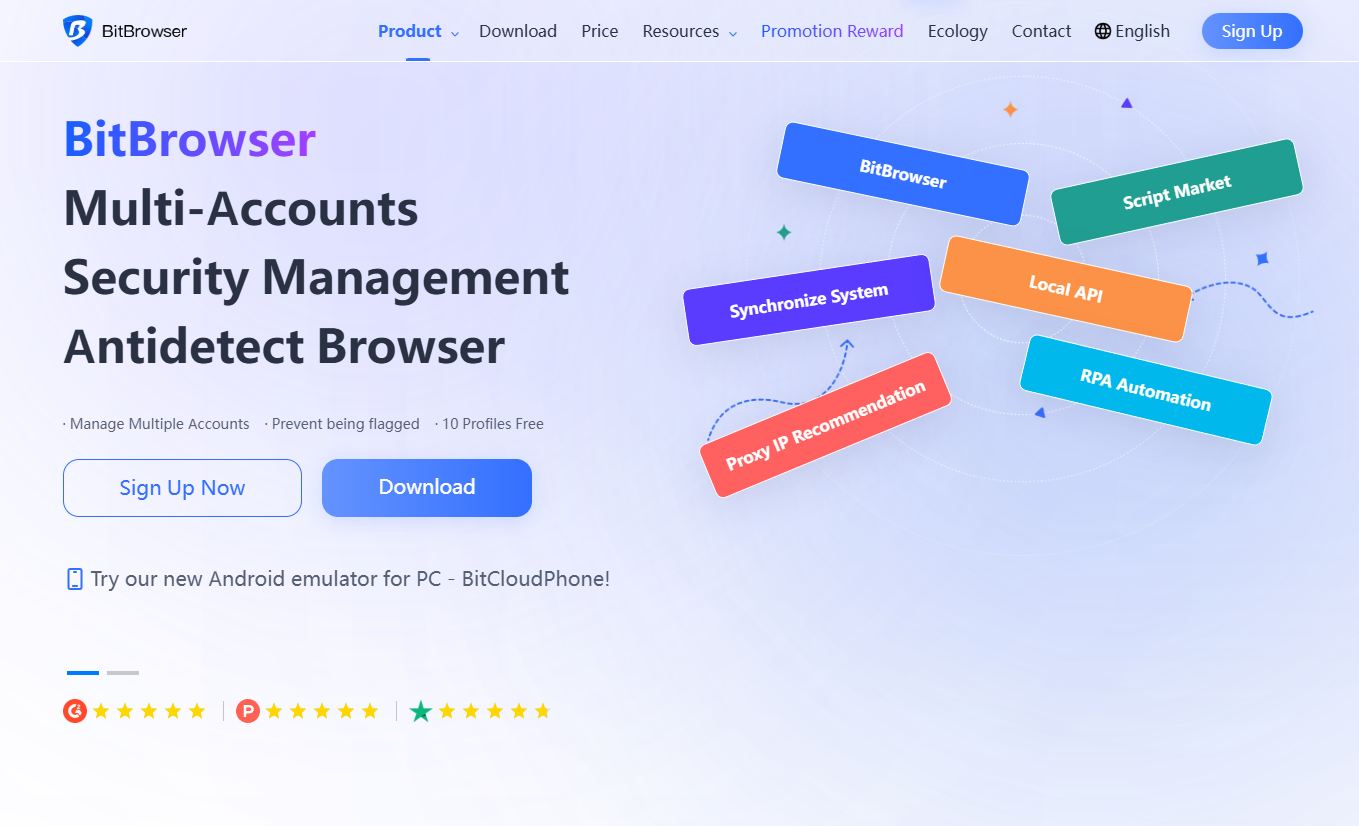
BitBrowser — this is a modern anti-detection browser and a powerful tool for securely managing multiple accounts. The platform helps hide your digital fingerprint, distribute permissions within your team, automate routine processes, and work with social networks, marketplaces, apps, and services without the risk of being blocked. The system combines a classic anti-detection browser with the BitCloudPhone cloud-based mobile product, making it convenient for marketing, e-commerce, SMM, arbitrage, SEO, and any tasks related to multi-accounting.
Prices BitBrowser
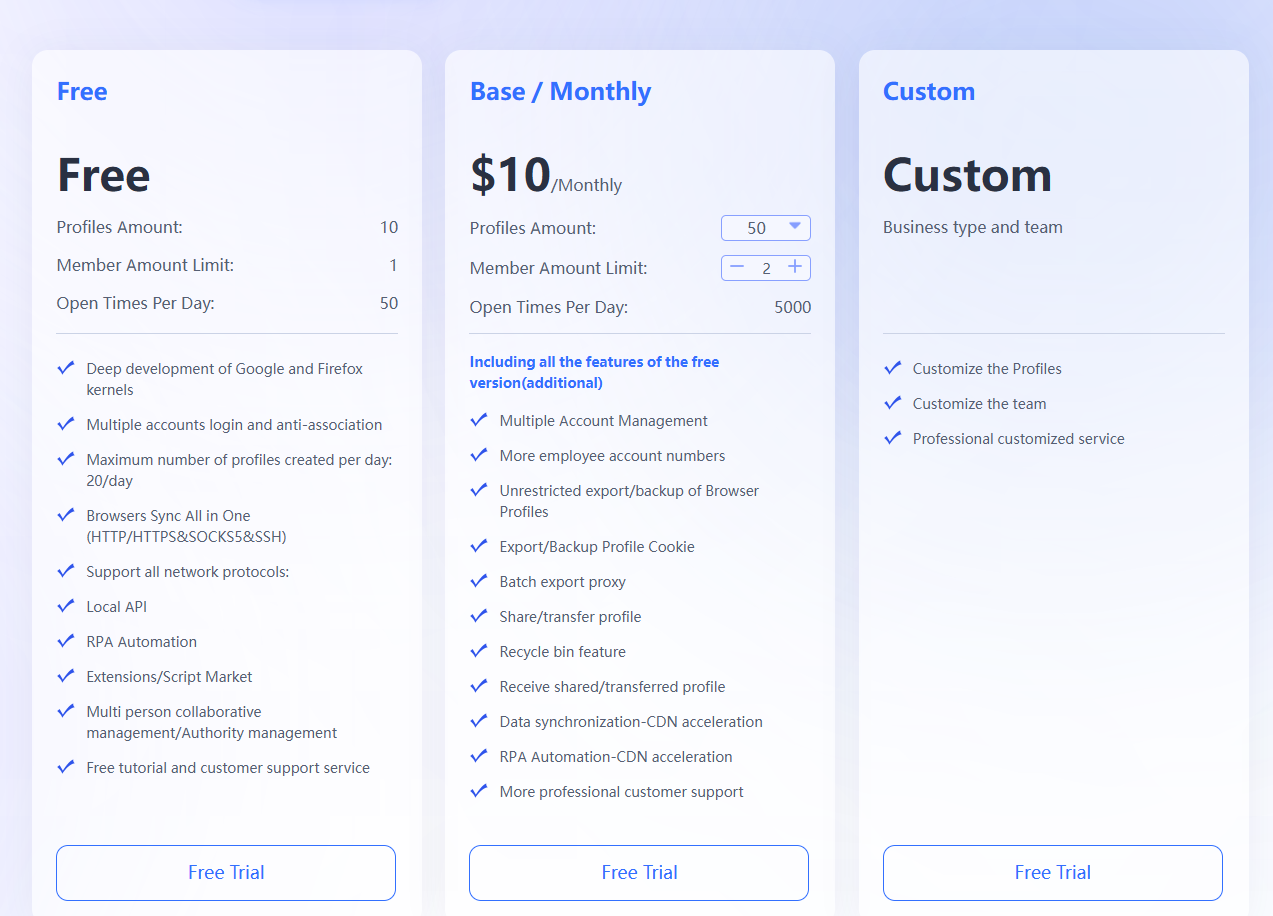
BitBrowser offers a flexible pricing system suitable for both beginners and teams that need to manage multiple profiles. Pricing depends on the number of available browser profiles, feature level, and automation tools.
The free plan offers a limited set of features, including a fixed number of profiles and limitations on virtual machine usage. Paid plans significantly expand functionality: they increase the number of profiles, unlock automation, provide team tools, secure data storage, and more stable operation without limitations.
Plans vary in the number of profiles, access to BitCloudPhone, anti-detection level, automation support, and priority technical support. The higher the plan, the more opportunities for comfortable multi-accounting, team collaboration, and professional browser use.
Products BitBrowser
BitBrowser — desktop anti-detection browser
BitBrowser provides everything you need to securely manage multiple accounts on a single device. It generates unique and realistic browser fingerprints based on the proxies used, protecting accounts from suspicious activity and blocking.
Key features:
- Multi-accounting: quickly log into dozens of accounts without logging out or re-authorizing.
- 30+ fingerprint spoofing parameters: UserAgent, WebGL, Canvas, Audio, fonts, language, DoNotTrack, Geo, IP protocols, Cookies, LocalStorage, and much more.
- Security and privacy: complete anonymity, local data protection, and stable anti-fingerprint detection.
- Independent proxies: support for any residential, mobile, static, and dynamic IPs; built-in proxy checking.
- Automation (RPA): APIs, scripts, synchronizers, extensions, and a ready-made script marketplace simplify repetitive tasks.
- Teamwork: share profiles with colleagues while preserving IP addresses, cookies, and settings.
- 10 free profiles to get you started.
BitBrowser is suitable for marketing, e-commerce, SMM, offer networks, marketplaces, and any tasks that require multiple accounts and stable identification.
BitCloudPhone — cloud mobile devices
BitCloudPhone — BitBrowser’s second product. These are virtual mobile devices that run in the cloud and allow you to host real Android environments for your accounts.
What you can do:
- Have multiple independent mobile environments without a physical smartphone.
- Run APK files, social media apps, and mobile versions of marketplaces.
- Test mobile apps directly from your computer.
- Manage accounts in a mobile environment, reducing the risk of blocking.
Limitations for free users
The following rules apply to free accounts:
- Only one free account can be used per device.
Additional accounts will not be able to create browser windows. - Using free accounts in virtual machines is prohibited—window creation will be blocked.
These restrictions do not apply to paid users.
Main functions of the ecosystem BitBrowser
Anti-detection and security
BitBrowser provides over thirty customizable browser fingerprint settings that allow you to create unique profiles for each account. Due to minimal overlap with other devices, services trust these profiles more, significantly reducing the risk of blocking.
Multi-Account Manager
The platform simplifies managing multiple profiles by consolidating them into a single, user-friendly interface. Switching between accounts is fast and secure, without data overlap or session loss.
Independent Proxies
The system supports all popular proxy types, including HTTP(S), Socks5, mobile, and residential IPs. A built-in testing mechanism allows for instant proxy performance checks, and bulk insertion speeds up the setup of dozens of addresses.
Web Automation
The ecosystem includes a built-in RPA module that helps automate repetitive tasks and browser-based actions. Local API support is available, and ready-made community solutions are available in the script marketplace, making it easy to automate any process.
Virtual Android Emulator
BitBrowser lets you run an Android environment directly in your browser. Using the built-in emulator, you can run and test APK files and manage mobile accounts without the need for a physical smartphone.
Teamwork
The system supports shared profile management, which is convenient for businesses and work teams. Users can transfer profiles while preserving all settings, cookies, IP addresses, and identifiers, ensuring a stable and secure work environment.
Additional Services
The ecosystem includes Google’s own Extension Center, the Proxy IP Recommendation service with a large selection of free IPs from different countries, RPA Browser Automation tools for automating tasks, and the Synchronize System for synchronizing data between devices.
Contacts BitBrowser
- Website: bitbrowser.net
- Website language: Ukrainian, Russian, English and many others.
- Technical support language: English.
Actual address of the head office: address: UNIT 9, BLOCK D, 6/F., FUK SING FACTORY BUILDING, 2 WALNUT STREET, TAI KOK TSUI
Technical support contact information
Technical support is available via Whatsapp, Telegram.
Payment methods: Bank cards (Visa, MasterCard, AliPay, WechatPay), PayPal.






Reviews
There are no reviews yet.