

iProVPN Review – Is It the Best Cheap VPN for Multiple Devices
Free Password Manager & Ad Blocker included! iProVPN is the VPN solution for seamless browsing, streaming, and privacy.
Description
Disclosure: This site may contain affiliate links. If you make a purchase through these links, I may receive a commission at no additional cost to you. However, all opinions are my own.
iProVPN is an budget-friendly VPN provider designed for basic online privacy protection and bypassing geo-restrictions. The service offers a standard suite of security features, including AES 256-bit encryption, a strict no-logs policy, a built-in ad blocker, and support for up to 10 simultaneous device connections on a single subscription. It is well-suited for everyday web browsing, securing data on public Wi-Fi networks, and affordable streaming. However, due to its relatively modest server footprint (around 250+ servers in 36+ countries), it may lag behind industry giants in raw speeds on less common server locations and in advanced network protocol customization options. If you need an economical everyday security tool backed by a generous money-back guarantee, iProVPN is worth considering; however, for complex network workflows, ultra-high-speed requirements, or niche geographic connections, larger alternatives might serve you better.
What Is iProVPN
iProVPN is a commercial virtual private network (VPN) service built to deliver online security, privacy, and freedom. The company provides dedicated applications for desktop systems, mobile devices, smart TVs, and web browser extensions, enabling users to encrypt their internet traffic and mask their real IP address. The provider is recognized for its aggressive long-term discounts (such as multi-year promotions offering “4 Years + 1 Year Free”) alongside solid core tools, including an integrated password manager and ad-blocking features.
Who iProVPN Is Ideal For
- Budget-Conscious Users: Thanks to steep promotional discounts on extended plans, the service costs significantly less than mainstream market leaders.
- Users with Multiple Devices: Supporting up to 10 simultaneous connections on one account easily covers the needs of an entire household or power user.
- Travelers and Public Wi-Fi Users: Essential security mechanisms like an automatic Kill Switch and AES 256-bit encryption safeguard personal credentials at cafes, airports, and hotels.
- Beginners: An intuitive, user-friendly interface across Windows, macOS, Android, iOS, and other supported platforms makes setup completely hassle-free.
When iProVPN Might Not Be the Best Choice
- If You Require a Massive Global Network: Hosting around 250+ servers, it covers fewer physical locations than established industry veterans operating thousands of nodes.
- For Bandwidth-Intensive or Speed-Critical Tasks: Some distant or high-load servers may experience higher latency or speed drops compared to top-tier providers.
- If You Need Enterprise-Grade Features: Specialized offerings like dedicated static IPs, custom routing tunnels, or complex corporate networking tools are less developed here.
Key Advantages
- Highly Competitive Pricing: Long-term subscriptions average under a dollar per month during promotional sales.
- 10 Simultaneous Connections: Generous multi-device allowance included right out of the box without extra charges.
- Strict No-Logs Policy: Promises zero monitoring, tracking, or recording of user online activity and browsing logs.
- Included Security Extras: Subscriptions frequently bundle complimentary password management and ad-blocking tools.
- Risk-Free Trial Period: A standard 30-day money-back guarantee allows users to test the service thoroughly before committing long-term.
Potential Drawbacks
- Modest Server Network: Roughly 250+ servers across 36+ countries is relatively small by major VPN standards.
- Younger Market Presence: While building a solid reputation, it does not yet carry the decade-long track record of legacy competitors.
- Variable Connection Speeds: Peak bandwidth performance on specific routes can fluctuate depending on server load and time of day.
Frequently Asked Questions by iProVPN Users
How do I log in to my iProVPN account?
To access your account dashboard, visit the official website and click on the “Login” button, or open the iProVPN app on your desktop or mobile device. Enter the email address and password registered with your account. If you cannot recall your credentials, use the password recovery link on the login page.
How do I contact iProVPN customer support?
Customer support is available 24/7. You can reach out to real customer service agents via the live chat widget located in the bottom-right corner of the official website or send an inquiry to support@iprovpn.com. You can also access setup guides and technical help documentation directly at support.iprovpn.com.
What should I do if iProVPN fails to connect?
First, verify that your underlying internet connection is working properly. Next, try switching to a different server location within the application, toggle the active VPN protocol (for instance, switching between default options or testing WireGuard), or restart both the app and your device. If connectivity issues persist, contact 24/7 live chat support for assistance.
How do I install iProVPN on different devices?
Download the official client for your OS from the respective platform store (App Store, Google Play) or directly from the official website for desktop computers (Windows, macOS, Linux, Chrome/Firefox extensions, Firestick). Run the installer, sign in with your account credentials, and select your preferred server to connect.
Does iProVPN offer a free trial?
iProVPN does not provide a permanently free plan. However, all purchases are backed by a 30-day money-back guarantee. You can subscribe, test out the full range of features and connection speeds, and request a full refund within the first 30 days if you are not fully satisfied.
How many devices can I connect simultaneously?
A standard iProVPN plan supports up to 10 simultaneous device connections. Additionally, during checkout, optional add-ons are available to purchase extra multi-login slots or upgrade to unlimited device connections.
When to Consider an Alternative
If your requirements demand expansive server infrastructures spanning thousands of global locations, dedicated IP addresses for sensitive financial workflows, or maximum speeds on niche overseas routes, iProVPN’s feature set may fall short. In such scenarios, exploring larger, premium alternatives geared toward heavy streaming, gaming, or corporate use is advisable.
Alternatives to iProVPN
| Provider | When It Fits Best |
| Hotspot Shield
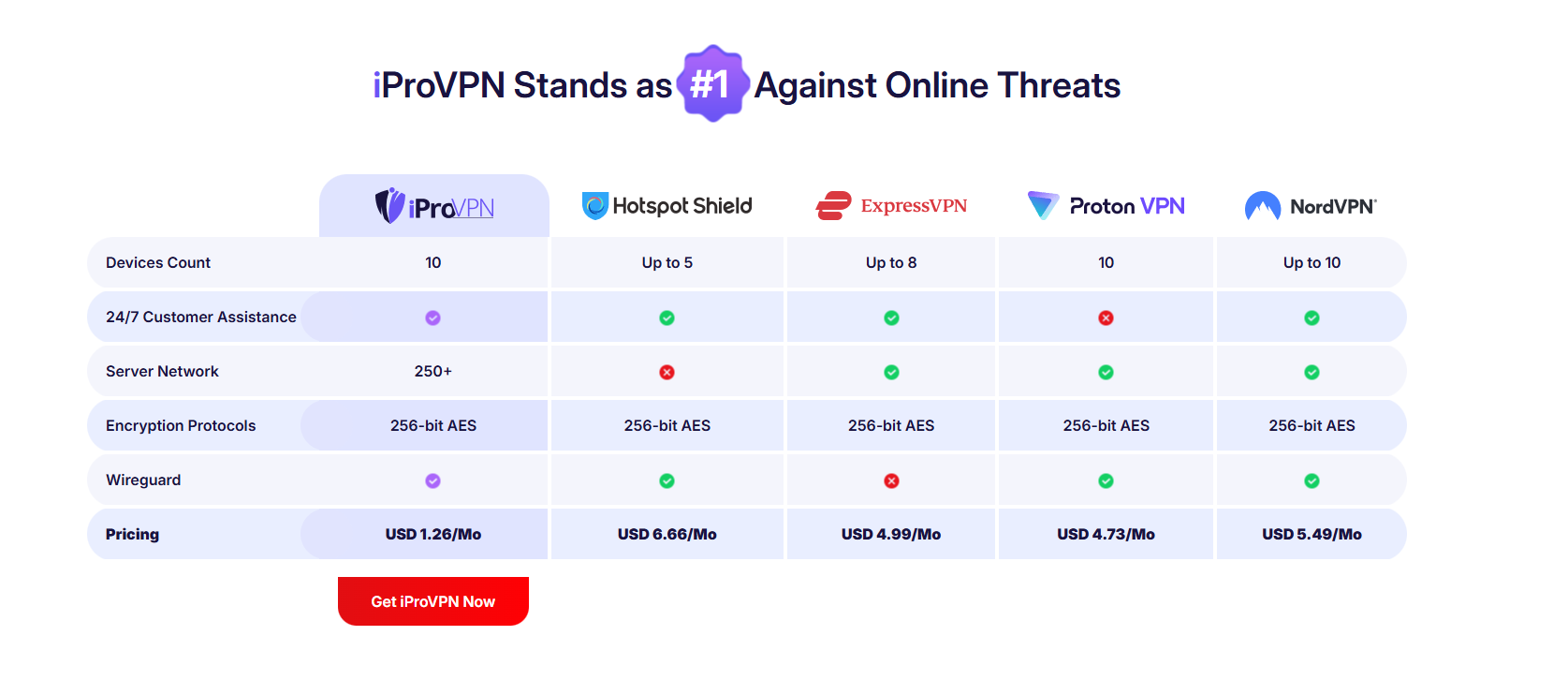
| Ideal for users looking for alternative options priced at USD 9.19/Mo with support for up to 5 devices and WireGuard protocol integration. |
| ExpressVPN
| Great for those prioritizing a proven server network and 24/7 support at USD 3.49/Mo with up to 8 simultaneous connections. |
| Proton VPN
| Excellent for users seeking a large server network, WireGuard protocol, and 10 device connections at USD 3.44/Mo. |
| NordVPN
| Best for users needing an extensive server network, WireGuard support, and 24/7 assistance at USD 2.99/Mo for up to 10 devices. |
Conclusion
Is iProVPN worth using? Yes, it represents a strong choice if your main priorities are budget savings, securing traffic across multiple personal and family devices, and overcoming standard regional restrictions. However, if your work demands enterprise-grade networking features or extreme server diversity, higher-tier market alternatives may better suit your needs.
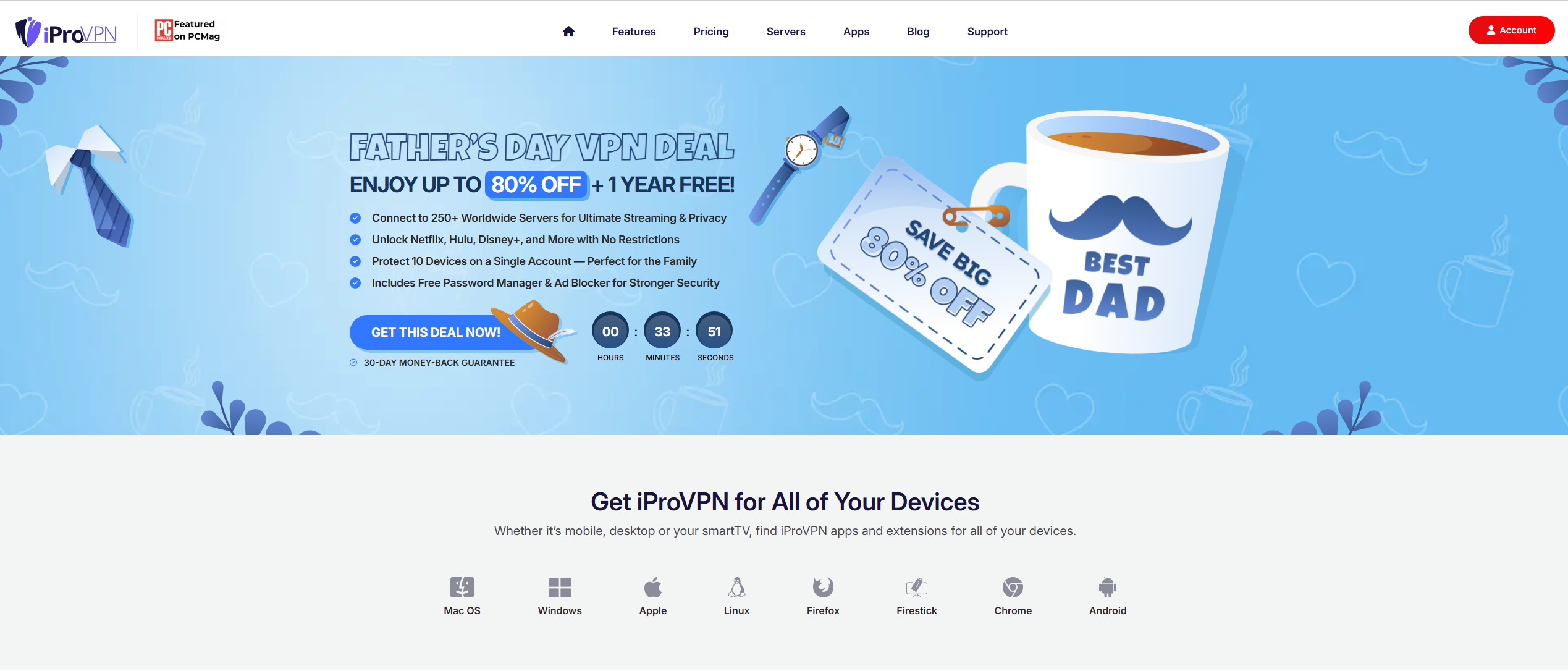
iProVPN is a stable and secure VPN service offering high speeds and excellent streaming capabilities.
It supports torrenting on select servers and delivers consistently fast performance for streaming, gaming, browsing, and downloading—even on long-distance connections.
With top-tier protection like AES-256 encryption, an automatic kill switch, and a strict no-logs policy, iProVPN keeps your online activity private and secure.
Why Choose iProVPN
- High-speed connections with zero buffering
- Global content access, including blocked websites and streaming services
- Quick setup via dedicated apps and browser extensions
- Up to 10 devices connected at once
- 30-day money-back guarantee ensures a risk-free experience
Plans and Discounts
iProVPN is one of the most affordable VPNs on the market.
In addition to great pricing, it offers generous discounts and a trial period.
Current deals include:
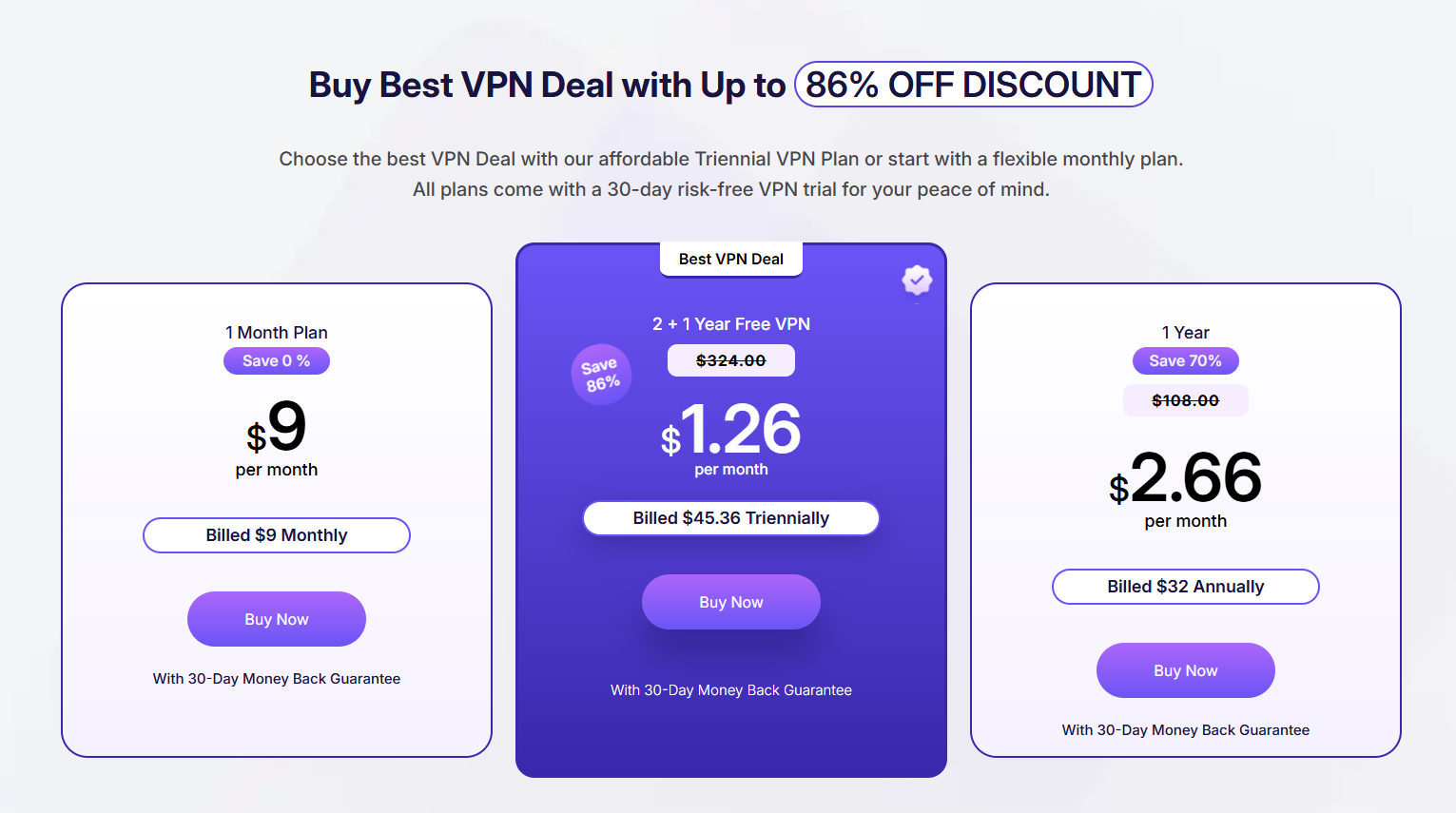
- Monthly plan — $9/month with a 30-day money-back guarantee
- 2+1 Years Plan — $1.26/month, billed $45.36 every 3 years (save 86%)
- 1-Year Plan — $2.66/month, billed $32 annually (save 70%)
All plans come with a 30-day money-back guarantee, making every option risk-free.
Core Features of iProVPN
Global Server Coverage
250+ servers across 45+ countries give you access to global content anytime.
Strict No-Logs Policy
iProVPN does not store your activity or browsing history—your privacy is fully protected.
Multi-Device Support
Connect up to 10 different devices simultaneously, including smartphones, desktops, routers, and gaming consoles.
Military-Grade Encryption
AES-256 encryption ensures your data stays secure from hackers and surveillance.
Split Tunneling
Choose which apps use the VPN connection and which access the internet directly.
Threat Protection
Built-in malware detection blocks harmful websites and threats before they can affect you.
Zero Lag Streaming
Enjoy content without speed drops or buffering—perfect for HD and 4K streaming.
Browser Extensions
Connect to your preferred VPN server directly from Chrome or Firefox.
Comparison with Competitors
When compared to other popular VPN services, iProVPN stands out for its balanced combination of speed, security, and affordability. Comparison:
Pros of Using iProVPN
- Available on Windows, macOS, Android, iOS, Linux, FireStick, Smart TVs, routers, Xbox, and more
- Unlimited bandwidth with no speed caps
- 24/7 customer support via live chat and email
- 30-day money-back guarantee with no hassle
- Educational blog with tech updates and privacy tips
How to connect iProVPN
1. Register on the official iProVPN website.
2. Go to the “Application” section and select the device you want to install the application on. In this example, Windows.
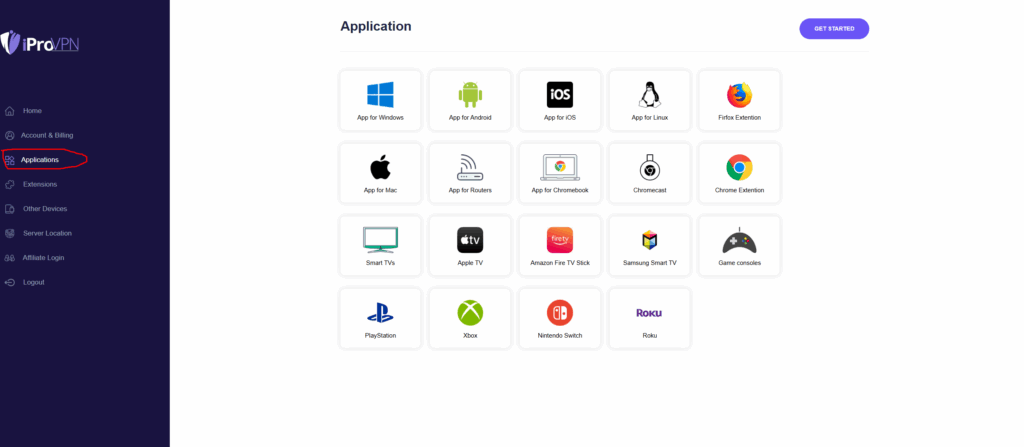
3. Download and install the app, then log in to your account.
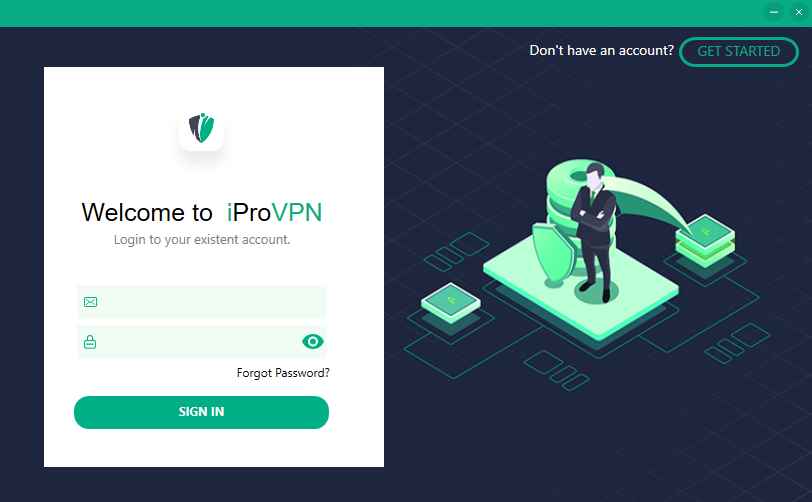
4. Once logged in, select the country you want and start using the VPN.
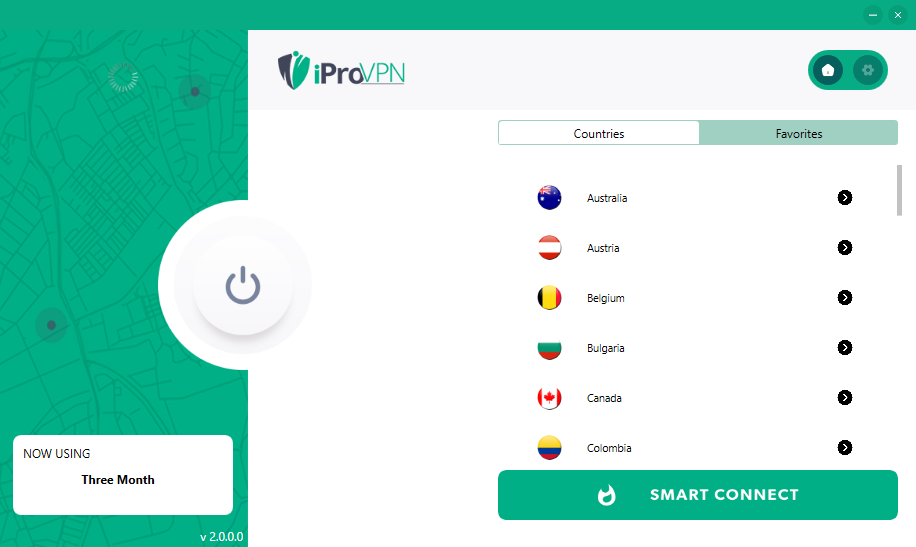
After all the actions mentioned above you will be able to use VPN without any problems.
Contacts iProVPN
- Website: iprovpn.com
- Website Language: English
Support language: English
Central office: address: TX, Houston – Northbelt Airport 363 N Sam Houston Pkwy E, Suite 1100 Houston, 77060, Houston, United States
Technical support contact information
Technical support. You can write to them by email or send a message on the website.
- email: support@iprovpn.com
- social networks: Facebook, Instagram, X (Twitter), Linkedin, Pinterest .
Payments: Bank cards (Visa, MasterCard, American Express, Discover, JCB, UnionPay), PayPal.











Reviews
There are no reviews yet.