
Vision Anti-Detect Browser Review
29.00$
Titan Browser Engine: real digital fingerprints instead of synthetic generation. Secure multi-accounting, session isolation, auto-synchronizer, and precise folder-level access management for teams. Test the full functionality of the platform free for 4 days — no credit card required.
Description
Disclosure: This site may contain affiliate links. If you make a purchase through these links, I may receive a commission at no additional cost to you. However, all opinions are my own.
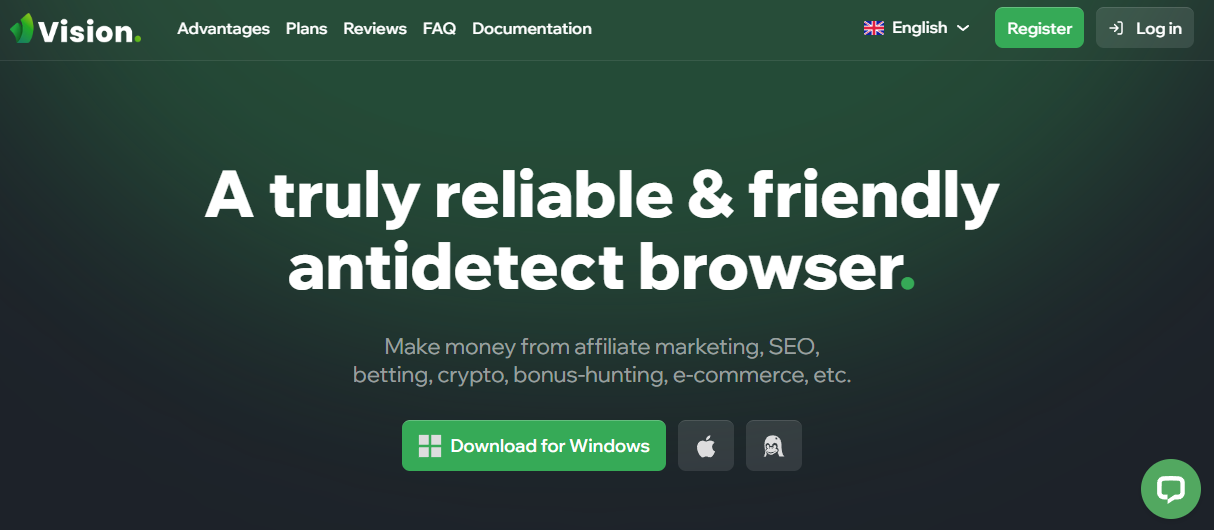
Vision anti-detection browser is designed for arbitrageurs and professionals working with multiple accounts. It offers a number of features that help users stay anonymous and secure on the Internet. Anti-detect browser specially designed to ensure complete anonymity and security of the user on the Internet.
Why Vision Browser is the Right Choice
Vision Browser isn’t just another anti-detect tool. It combines the best features from popular anti-detects and adds something unique. This anti-detect tool works with all types of traffic—social media, Google, Amazon, and more. Whether you’re into token sales, airdrops, marketplaces, bonus hunting, arbitrage, or betting, Vision will be an indispensable tool for multi-accounting. Trusted by giants like Google, it’s among the best anti-detect browsers available.
Main features and advantages
Vision is built on the Chromium base, with plans to add a Firefox-based core. This is a standard foundation for anti-detect browsers. What really sets Vision apart is what’s packed into the tool. It manipulates the “fingerprints” of the browser and other parameters that form a unique user profile, making it undetectable by anti-fraud systems.
- Data anonymization: changing User-Agent, substituting WebRTC parameters, Canvas, etc.
- Interface: Vision has an intuitive interface that simplifies working with multiple profiles. Users note the convenience of grouping profiles into folders, which significantly increases the comfort of work.
- Multiple profiles: The ability to create and manage multiple profiles simultaneously.
- Profile isolation: Each profile operates in a separate isolated environment, which prevents data leaks between profiles.
- Scripts and macros: The ability to automate routine tasks using scripts and macros.
- Top-Notch Security: Vision is your fortress. The synchronization and data upload system is fully secure, encrypting data with a 256-bit AES key. Even Vision’s developers can’t access your data.
- Cross-platform: The browser works on Windows, macOS, and Linux—basically, all popular operating systems.
- Frequent Updates: Vision developers regularly update the app as new versions of Google Chrome are released. All new features and improvements are automatically integrated into the program.
- Technical support: The browser offers several ways to contact technical support, including Telegram and email, which allows you to quickly solve problems. 24/7 support is available, and for large teams, there’s a convenient Telegram chat to handle questions quickly.
Real Fingerprints
Vision generates real browser “fingerprints”. This includes a range of parameters like screen resolution, language settings, OS version, installed fonts, time zone, and more. By altering the User-Agent and geolocation, it hides your browser and device details, masking your location. This way, websites see only fake data, keeping you unnoticed, while from an anti-fraud perspective, the generated profile looks just like a real one.
Tools to Simplify Your Work
Vision offers a solid set of features. Make the most of them:
- Create folders for profiles to stay organized and easily find what you need with colors and icons.
- Manage profiles with tags, notes, and statuses to keep important information handy.
- Conveniently add extensions once, and they’ll be available across all profiles.
- Use the Cookie Robot to upload or create necessary cookie files.
- Easily move profiles between folders or teams for simplified management.
- Check proxy performance and change IPs with a single click.
- Activate Zen Mode to hide the sidebar and focus on tasks.
Installation and Registration
To install Vision, you need to go to the official Vision website and select the appropriate version for your Windows, MAC or Linux operating system. Registration is done via a form on the website, where you need to specify your e-mail address and password. Getting started with the antidetect browser is straightforward, though process details vary depending on your operating system. To begin, navigate to the official Vision website, register an account (using your email and password), and download the appropriate installer for your OS: Windows, macOS, or Linux.
Linux System Requirements
To ensure smooth operation on Linux distributions, your system must meet the following minimum parameters:
- OS: 64-bit versions of Ubuntu 18.04+, Debian 10+, openSUSE 15.2+, or Fedora Linux 32+;
- CPU: Intel Pentium 4 or newer with mandatory SSE3 instruction set support;
- Architecture: x86_64.
Installing Vision on Linux: DEB vs AppImage
For Linux users, the developers offer two build formats: .deb and .AppImage. The choice depends on your distribution and administration preferences:
- DEB Package (Debian / Ubuntu / Mint) A classic package format for Debian-based distributions, installed via a package manager (
dpkgorapt). Pros: Integrates natively into the system as a standard application, automatically registers menu shortcuts, and properly resolves system library dependencies. - AppImage (Universal Format) A standalone executable file containing the browser and all required libraries bundled inside. Suitable for any Linux distribution (Fedora, Arch Linux, openSUSE, etc.). Pros: Requires no installation or superuser (root) privileges. Simply make the file executable (via
chmod +x vision.AppImage) and launch it with a single click.
Tip: If you are running Ubuntu or Debian, choosing the DEB package is recommended for better OS integration. If you use a different distribution or prefer an isolated execution without installing extra packages into your system, opt for AppImage.
Running Vision AppImage on Linux (Step-by-Step)
Running the browser via AppImage does not require superuser (root) permissions. Simply execute three quick commands in your terminal:
- Navigate to your downloads directory:
cd ~/Downloads - Make the file executable:
chmod +x vision.AppImage - Launch the browser:
./vision.AppImage
Alternatively, you can launch the file without opening a terminal: right-click the downloaded .AppImage file, open Properties → Permissions tab → check “Allow executing file as program”, then double-click to launch.
Note for Ubuntu 22.04+ and Debian 12+: If double-clicking the AppImage produces no output or the terminal throws a FUSE error, install the required system library with a single command:
sudo apt install libfuse2 -y
Pricing and Tariffs
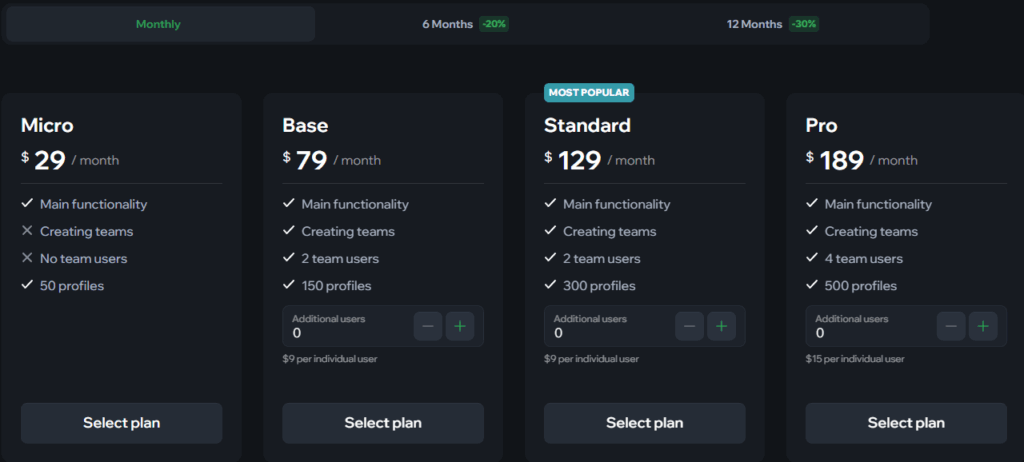
Vision is not a free product. At the moment, a trial Team plan is offered, which allows users to familiarize themselves with all features without obligation. The paid Micro plan for single-user access starts at $29 per month. If you need teamwork, use the Base plan.
Here are the available plans:
- Micro. For $29 a month, you get 50 profiles. There’s no team creation, so it’s perfect for personal or small work tasks.
- Base. Costs $79 per month. With this plan, you’ll get 150 profiles and the ability to add up to two users to a team. This plan is suitable for medium-sized projects where you need more profiles and up to three users at a time.
- Standard. Costs $129 per month. You’ll get 300 profiles and the ability to add up to two users to a team. Ideal for both solos and teams.
- Pro. Costs $189 per month. With this plan, you’ll be able to manage 500 profiles and add up to 4 users to a team. This plan is ideal for larger teams.
- Max. Costs $289 per month, This plan includes 1000 profiles and up to 4 additional users.
- Ultra. Costs $389 per month. The plan includes 1500 profiles and 5 additional users by default, and allows you to add unlimited users and profiles. This plan is best suited for large teams and organizations that need to manage a large number of profiles.
For additional information, visit the official website. You can ask questions in the Vision community chat or follow company updates on their official Telegram channel.
A detailed cost analysis, including the entry-level team plan and ROI estimation, is available in the Vision Team Plan Review on the AntidetectHub portal. Before purchasing, it is also worth comparing Vision’s capabilities with competitors in the same price segment. For instance, our detailed BitBrowser VS Vision comparison breaks down key differences in browser fingerprints, performance speed, and multi-account management efficiency.
Recommended Proxies for Competitor Monitoring and Data Collection
Using trusted proxy services ensures a stable and secure connection when working with anti-detect browsers. Keep in mind:
- Don’t compromise on proxy quality — your online security and anonymity depend on it.
- Check user reviews and feedback before purchasing proxies.
- Test different proxies to find the best fit for your specific needs.
Below are some recommended proxy options (for a full list, please see our comprehensive proxy provider reviews):
 | Premium proxy provider with hybrid quality filtering (IP reputation check), residential traffic cashback, and sticky sessions up to 24 hours. Access to 30+ million residential IPs and 250 thousand mobile proxies with country selection. | |
 | Dynamic mobile, residential, and datacenter proxies. Geolocation targeting by country, city and provider or ASN. Balance replenishment in fiat and cryptocurrency, API and OpenVPN compatibility, SOCKS5 and HTTP(S), traffic packages from 100 MB at low price from $0.37. Up to 250 TCP connections per port are supported simultaneously. | |
 | Geonix offers proxies with global coverage — more than 200 countries, including rare regions. Fast activation, choice of IP type (IPv4, ISP, mobile, residential) and high compatibility with any tools all this makes the service a universal solution for tasks of any complexity. |
Conclusion
Vision is a powerful tool for those who are involved in arbitrage and need a reliable anti-detection browser. Whether you are an internet marketer, security specialist or just concerned about your privacy, Visio will be a great choice for your professional activities. Its functionality and convenience make it one of the best solutions on the market. We recommend you to try a 4-day trial with full functionality to appreciate all the advantages of this browser.

Additional information
| Popular Payment Methods: |
|---|









Zakari –
The updates come out on the regular, like twice a month, sometimes more often. I don’t remember a single time when something had to be fixed after an update. Instead, everything runs more smoothly and a bit faster. To be honest, Vision is the only program that doesn’t frustrate me. All in all, it’s just a tool. Reliable and user-friendly
Maxim –
I love that Vision focuses on being logical over being “perfect”. It shows. The workspace/personal account switching is super smooth, and the cloud storage? Impeccable. Not one problem in half a year — a huge deal for me.
Boris –
I finally reached a point where I was tired of dealing with the constant bugs, so I made the decision to try something new. And I haven’t regretted it at all. Everything ran smoothly – no crashes, no lost profiles. The speed didn’t drop; it actually got faster. The best part is the feeling of confidence that everything is under control and I can just focus on my work. It’s a rare feeling when you’re not constantly testing the software, but actually using it.
Artur –
It seems like Vision was built by people who’ve actually used this kind of tool. It’s not some over-engineered product. Everything is in its place, the logic is clear, and it doesn’t have any of those annoying pop-up “helpers” or pointless UI changes. From the moment I started, it was refreshing that no manual was needed – the design is just that intuitive
Roby –
Vision isn’t about being lightning-fast or having a standout feature. It’s simply solid, reliable software. When you spend all day using your browser, that kind of thing matters. In six months, nothing has ever crashed, bugged out, or made me reinstall. Some people might not care, but for me, it’s a guarantee that my day won’t be ruined.
Harmer –
We discovered Vision by accident. A colleague tried it and dropped a link in our team chat. Skeptical at first, we were all using it within a few weeks and the difference was palpable. A sense of calm replaced the usual chaos. Instead of spending our days fixing problems, we were finally moving forward. Our team discussions evolved from frustrating workarounds to strategic plans for real results. It was a revelation – we suddenly understood how efficient and focused our work could be.
Mariam –
Vision offer a quiet reliability that I didn’t know I was missing. It’s the kind of tool you can set and forget – not flashy, but indispensable. Everything just works logically and predictably. Unfortunately, these qualities feel exceptional now because we’ve simply become accustomed to everything else being a mess.
Robi –
When tools aren’t working properly, people start getting nervous and point the finger at their colleagues, looking for someone to blame. When everything’s running smoothly, the team just does its job. And we started arguing less and less because, honestly, we had nothing to argue about. What’s interesting is although it might not seem obvious, Vision actually helped reduce the tension in our team.
Mark –
Profiles, farming, bundles — with a laggy browser, all of this is going to be a headache. With Vision, I didn’t have to worry about it slowing down my work. And now, I don’t need make a backup plan every day and I don’t have a “just in case” profile. I’ve only got one working profile, and that’s it. This is a new experience for me. I’m thinking of sticking with it for a while.
Larry –
I used to accept spending an hour daily on browser “maintenance” – restarting profiles, handling updates, and dealing with support was just part of the routine. Vision put an end to that. Initially, I didn’t know what to do with the saved time, but I soon realized it was going back into the campaigns. Now, my workflow is simple: log in, check stats, switch profiles, and focus on my tasks. The constant minor hiccups and chaos have vanished. The outcome is higher productivity, lower stress, and the mental space to focus on strategic thinking.
Teo –
Vision is unique because its developers really understand what users are looking for. Some of the features that show this include one-click migration from Dolphin, subscription credit for switching, and the ability to change your plan on your own without having to contact support. And these aren’t just marketing promises — they’re actual solutions to everyday problems. For us, being able to change the plan on our own has been a game-changer. It lets us grow quickly without a lot of paperwork. When we ran a promotion, we just upgraded our plan, gained instant access to more profiles, and kept working. A task that would’ve taken hours with other tools was finished in five minutes.
Denis –
When my colleagues suggested I try Vision, I wasn’t so sure. But after a couple of weeks, I realized that I was less nervous. Those little annoying glitches that had been bothering me just went away. It might not seem like a big deal, but it gave me more energy to work.
Damir –
I don’t have a beautiful story about “switching” or “picking”. I just noticed that my coworkers are getting fewer bans lately. So I asked them about it. The answer was: “Vision.” I said, “Okay.” And that was it. Three days later, I realized I was swearing less. A week later, I realized I didn’t want to complain in chat rooms anymore. A month later, I realized that, for the first time ever, I was working without chaos.
Ambel –
I have been working with traffic for over 7 years and I’m used to anti-detect browsers being a separate headache you constantly have to manage. But Vision changed that. For me now, it’s on the same level as email – I just open it and work, with no surprises. It’s not about a “convenient interface” or a “powerful core” – it’s about the confidence that your tool won’t fail you when you launch a campaign. And in this niche, that’s probably the most underrated value.
Iridan –
This antidetect isn’t “special” – it just works as it should , without crashes or hangs. Profiles are stable, nothing’s disappearing, and the whole process is under control. Best of all, you won’t feel like you’re taking a risk every single session – everything is steady. I’m not as distracted by the technical stuff anymore. And I finally can focus on my work instead of trying to figure out how to get around another bug.
Makis –
I like the details. For example, Vision handles profiles with care – not a single accidental unlogging in 3 months . Or the way you can change your plan here super fast – and nothing goes off. Or how you just open Ad Library and download creatives — you don’t need any extra tools or complicated steps. These things aren’t “features” – they’re habits.
Mario –
For the first time, I’m not afraid of updates. With other solutions, every update feels like a mini lottery — will it break something or not? But here, updates go smoothly. Quietly. Nothing gets broken. Things just get better. That’s rare to see in software, especially in antidetects.
Kevin –
I wasn’t trying to find the perfect browser; I was just tired of the daily routine of customizing, fixing, and waiting. One day, I simply wanted peace and quiet. Vision gave me that — no conflicts, surprises, or data loss. Profiles load quickly, and everything is stable and works well. It’s rare to find a product made for users rather than marketing purposes.
Genry –
After switching to Vision, the number of bans decreased significantly. I didn’t make any additional customizations; I just transferred profiles and they started lasting longer. The prints here are well-thought-out and realistic, without any strange distortions. The difference is immediately visible in the work.
Zacari –
If you’re working with a few dozen accounts, this anti-detect is a great solution. It’s easy to set up proxies for each profile, everything works quickly, and most importantly, stable. This is really important for me when I need to maintain my anonymity and work efficiently.
Denny –
I use Vision to manage hundreds of accounts on social networks. Proxies are set up individually for each account, which is super convenient. The interface is solid and reliable. It works great even with a lot of data, and it’s pretty fast. Plus they’ve got great prices and their support is pretty good, too.
Frank –
Vision seems like a well-thought-out workplace, not just a browser- it’s got everything you could need. I like that I can multitask with different projects in a single window, everything is organized, and everything runs smoothly. Plus, profiles last a long time without any issues. I also appreciate that these guys are focusing on the process here, rather than just making empty promises.